
Summary
Your B2B catalog is invisible to AI search because you put it behind a login. That was a sound commercial decision, and you should not undo it. The problem is that the login now hides the parts of your catalog that were never sensitive.
An AI system cannot recommend a supplier whose products it cannot read. The fix is not more schema markup. It is deciding which layer of your catalog is public and which layer stays private.
Introduction
A buyer asks an AI assistant to find suppliers for a part you stock. You are not in the answer. Your competitor is, and their catalog is worse than yours.
Most advice about this problem tells you to add structured data. That advice assumes a public catalog. Yours is behind a login, so there is nothing for the markup to describe.
This post is about the decision underneath the markup. You gated your catalog for real reasons. You almost certainly gated more than you needed to.
Table of Contents
- Why can’t AI search see your B2B catalog?
- Why does a missing price matter more than missing markup?
- How do you fit six negotiated prices into one schema field?
- Which parts of your catalog should actually be public?
- What does this look like inside WooCommerce?
- What can you change this week?
- People also ask
- Conclusion
- Frequently Asked Questions
Why can’t AI search see your B2B catalog?
Because there is nothing at the other end of the request. When an AI system fetches a gated product URL, it receives your login screen. It does not receive a partial version of the page.
This is different from ranking poorly. A page that ranks poorly still exists in the index. A gated page never entered it.
What a retrieval bot actually receives
Retrieval bots read pages the way a logged-out visitor does. They do not hold accounts, and they do not fill in login forms. Whatever a stranger sees is the whole of what they get.
Open your own product page in a private browser window. That view is your entire AI presence for that product.
Why gating was the right call in the first place
You gated the catalog because your prices are negotiated per account. Publishing them tells every competitor what you charge. It also tells your largest customer what your smallest one pays.
None of that has changed, and none of it is the argument here. The argument is that price is one field, and you hid a thousand others alongside it.
Why does a missing price matter more than missing markup?

Because price is a required field, and markup without it does not qualify for the results you want. You can write perfect structured data and still be ineligible.
What Google requires for a merchant listing
Google’s merchant listing structured data documentation lists name, image, and offers as required. Inside offers, price and currency are both required. The documentation specifies a price greater than zero.
It also states that only pages where a shopper can buy the product qualify for merchant listing experiences. A quote-only page fails both conditions. That conclusion follows from the stated requirements, and Google does not address quote-only catalogs directly.
Why “request a quote” is not an offer
An AI system comparing suppliers is looking for something it can evaluate. A quote button is a promise to discuss terms later. It carries no number, no availability, and no commitment.
Plain Product markup without a price is still valid, so the page is not invisible in general search. It simply cannot compete in any surface that compares products on commercial terms.
How do you fit six negotiated prices into one schema field?
You do not, and pretending otherwise causes a worse problem than staying silent. One product with six customer groups has six correct prices. A schema offer holds one.
Why a representative price makes it worse
Some stores publish list price and let the login reveal the real number. This looks harmless and is not. Every buyer whose contract beats list now sees a figure that misstates their terms.
An AI system reading that page will quote the published figure to a buyer. You then start the conversation by correcting your own website. That is a worse opening than having no number at all.
What you can publish instead of a number
Publish the shape of your commercial terms rather than the terms themselves. Whether you price in volume tiers is not confidential. Neither is your minimum order quantity or your standard lead time.
That information lets a buyer qualify you without exposing a single negotiated rate. It also gives an AI system something specific to say about you. The WooCommerce B2B configuration guide covers how those tiers are set up in the first place.
Which parts of your catalog should actually be public?
Split your catalog into three layers and gate only the third. Most B2B stores draw the line above all three, which is why they disappear.
Layer one, that the product exists
This layer is the product name, specification, materials, dimensions, and certifications. It includes what the product fits and what it replaces. None of it is commercially sensitive.
Your competitors already know you stock these products. Hiding this layer protects nothing and costs you every discovery query.
Layer two, the shape of your commercial terms
This layer describes how you sell without saying what you charge. Volume tiers, minimum order quantities, lead time ranges, and who you sell to all belong here.
A buyer uses this layer to decide whether you are worth a conversation. So does an AI system building a shortlist.
Layer three, the number that stays private
This layer is the account’s actual negotiated price, and it stays behind the login permanently. That is the correct place for it.
Layer | Example | Public? |
|---|---|---|
The product exists | 316 stainless ball valve, half inch, NPT thread, WRAS approved | Yes, always |
Commercial shape | Sold in volume tiers, minimum order 25 units, ships in 3 to 5 days | Yes, safely |
Negotiated price | Your rate for this account at this volume under this contract | No, keep it gated |
Catalog exposure layers for a gated B2B store, August 2026.
What does this look like inside WooCommerce?
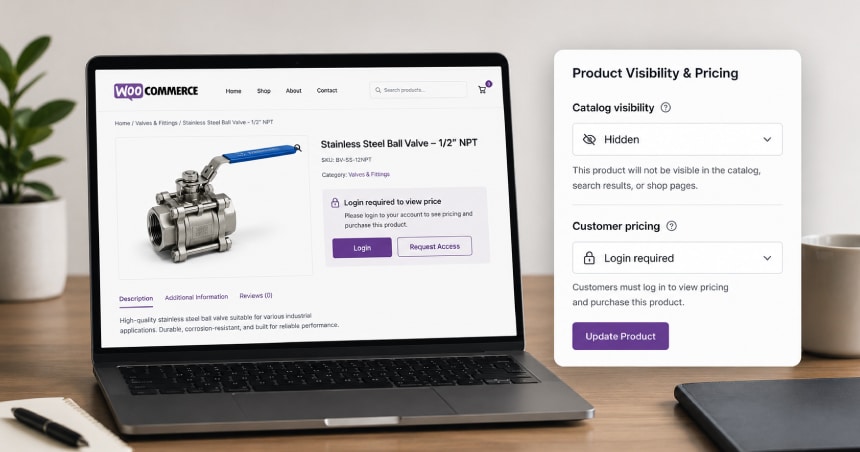
Two settings do most of the damage, and both are easy to apply harder than you meant to. One is per-product catalog visibility. The other is whichever plugin runs your role-based pricing.
Catalog visibility is stricter than most owners think
WooCommerce lets you set each product to shop and search, shop only, search only, or hidden. Hidden removes the product from your own store search as well.
Owners often set hidden on a whole range to keep prices private. Visibility and pricing are separate controls. Hiding the product was never required to hide the number.
Role-based pricing is a plugin decision, not a core one
Customer group pricing on WooCommerce comes from a plugin rather than from core. That matters because each plugin decides what a logged-out visitor sees.
Some replace the price with a login prompt and leave the page intact. Others hide the product entirely. Check which behaviour yours applies before assuming the catalog is reachable.
Where your real product data lives
The specifications worth publishing usually sit in your ERP, not in WooCommerce. Getting them onto the storefront is a data problem before it is a marketing one. Our guide to WooCommerce ERP integration covers the sync patterns involved.
Buyers who already have an account still need the gated experience to work well. That is the job of a proper B2B customer portal. It sits behind the login, not in front of it.
What can you change this week?
Start by finding out what a stranger can see, then move the line down one layer. None of this needs a rebuild or a development sprint.
- Audit logged out. Open ten product pages in a private window. Write down what a stranger can read about each one.
- Separate the two controls. Check whether products are hidden when only the price needed hiding.
- Publish layer one. Put specifications, materials, compatibility, and certifications on the public page.
- State your terms without numbers. Say that you price in tiers, and give your order minimum and lead time.
- Check robots.txt. Confirm you are not blocking the retrieval bots you now want reading the public layer.
- Leave the price alone. Layer three stays gated, and no part of this asks you to publish a rate.
Larger catalogs need this applied by product family rather than one page at a time. Our WooCommerce development services cover that scale of change. The wider B2B ecommerce development practice handles the catalog structure behind it.
People also ask
Does publishing product specifications help competitors?
Rarely, because competitors in your category already know what you stock. They read your catalog, attend the same trade shows, and buy from the same manufacturers. Specifications are the least defensible information you hold.
Will opening part of my catalog hurt my search rankings?
No. Making previously gated pages crawlable adds indexable content that did not exist before. The usual risk is thin duplicate pages, which is a content quality question rather than a gating one.
Is this the same as being agent-ready?
It is the step before it. Being readable to AI shopping agents assumes an agent can reach your product pages at all. A gated B2B catalog fails at that earlier point.
What about punchout catalogs?
Punchout serves buyers already inside a procurement system, so it solves a different problem. It does not help a buyer who has not yet chosen you. Our punchout catalog integration guide covers that channel separately.
Conclusion
You did not lose AI visibility by neglecting your markup. You lost it by making one commercial decision and applying it to your whole catalog.
Your negotiated prices should stay private. Your product specifications never needed to be. Separating those two things is a configuration and content exercise, not a replatform.
Start with the private browser window. What a stranger sees today is what every AI system knows about you.
Frequently Asked Questions
Do I have to publish prices to appear in AI search results?
No. You need a public page an AI system can read, which is a separate requirement from publishing a price. Without a price you forfeit merchant listing eligibility, but you remain available for discovery, comparison, and shortlisting.
Can I show prices to AI systems but not to competitors?
Not reliably. Anything served to an unauthenticated bot is served to anyone who sends the same request. Treat any price you expose to a crawler as fully public.
Should I put a list price on the page and discount after login?
Only if list price is genuinely what a new account pays. If most buyers hold a better rate, the published figure misstates your terms. An AI system will repeat that figure to a buyer before you get to explain it.
How do I check what an AI system can see on my store?
Open the page in a private browser window with no session. That view is close to what a retrieval bot receives. Then check your robots.txt to confirm you are not blocking the crawlers you want.
Does this apply if my catalog is public but has no prices?
Partly. You have cleared the hardest problem, since your pages can be read at all. You still forfeit merchant listing eligibility, so focus on specification depth and commercial terms instead.
How long does it take to open up the public layer?
Settings changes take an afternoon. The real work is getting specification data out of your ERP and onto product pages. That timeline depends on how clean your product records already are.
Will my existing customers see any difference?
Logged-in buyers keep the same prices and the same account experience. The change affects only what a logged-out visitor can read. If anything, richer public pages reduce the questions your team answers by phone.