Summary
Your WooCommerce store is live and your ERP is running, but they’re not talking to each other yet, and you’ve been told the connector takes six to eight weeks to set up. What nobody mentions is the three to four months of manual cleanup that typically follows when manufacturers skip item master reconciliation and data mapping before connector selection. This guide covers the exact pre-integration sequence that prevents that cycle, then walks through connector selection, cost, and timeline benchmarks so you can budget realistically.
Introduction
Most ERP integration failures don’t announce themselves at go-live. Your connector tests pass, your UAT scenarios look clean, and your team celebrates. Then real transactions start flowing, and within weeks you’re dealing with rejected order lines, inventory counts that don’t match the warehouse, and B2B customers seeing the wrong prices at checkout. By the time someone diagnoses the root cause, you’ve burned three months on manual reconciliation.
The connector is almost never the problem. According to APPSeCONNECT’s analysis of ERP integration failures, most failures happen because data arrives in the wrong shape, lands in the wrong field, or is missing information the ERP requires, problems that surface after go-live, not during setup. And according to Gartner’s 2024 research cited by Shopify Enterprise, 70% of ERP projects fail to meet their stated business goals.
The common denominator isn’t connector quality, it’s the work that wasn’t done before the connector was selected. This guide gives you that work in the right sequence: item master reconciliation first, data mapping second, sync architecture third, pricing architecture fourth. Get those right, and connector selection becomes a much narrower decision.
Table of Contents
- Why most WooCommerce ERP integrations fail
- Step 1: reconcile your item master before anything else
- Step 2: map your data fields explicitly
- Step 3: decide what syncs in real time and what does not
- Step 4: make the ERP your pricing engine
- Choosing your connector: three approaches
- Cost and timeline: what to budget
- People also ask
- Conclusion
- FAQ
Why most WooCommerce ERP integrations fail
The pattern is consistent enough to be predictable. A manufacturer selects a connector, completes setup in six to eight weeks, and goes live. Orders flow. The team moves on. Then real-world transactions expose what controlled testing missed, and the problems compound quickly.
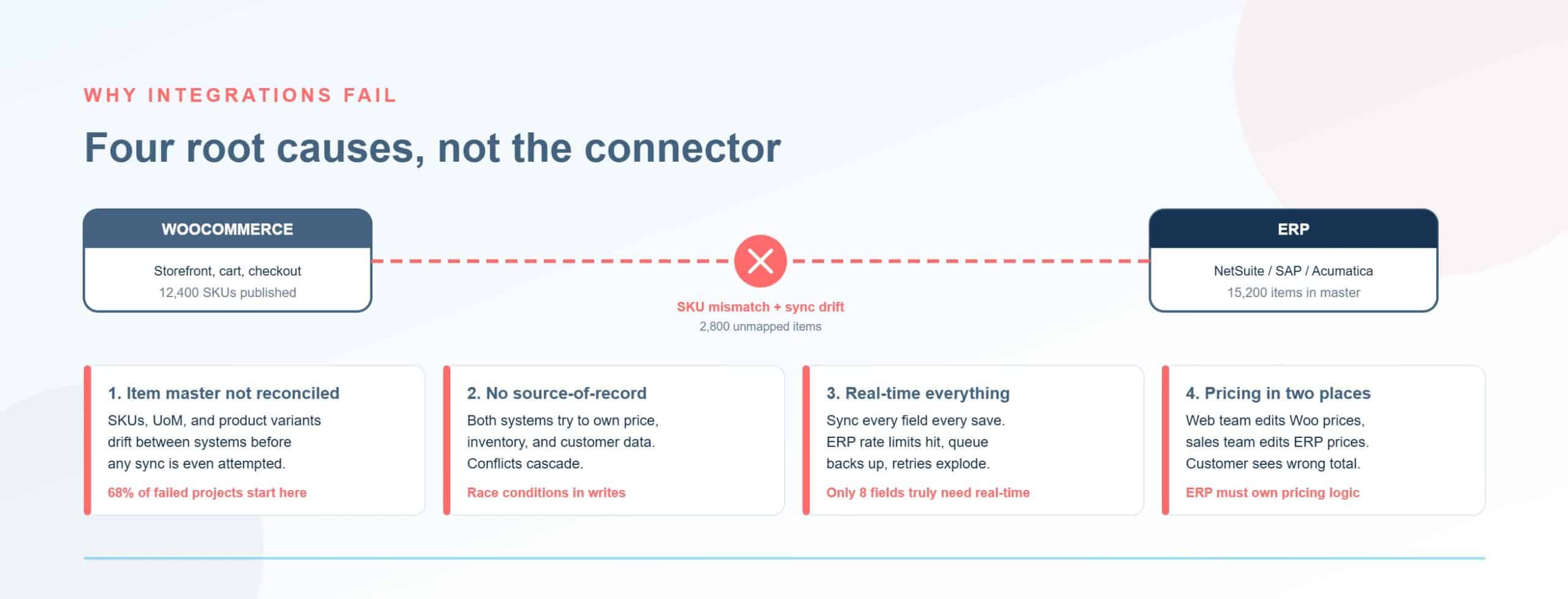
Three failure modes account for the majority of rebuilds. The first is an unreconciled item master: the ERP item codes and WooCommerce SKUs don’t cleanly correspond, so the connector maps whatever aligns and silently skips the rest. The second is implicit data mapping. No one wrote down which field in WooCommerce maps to which field in the ERP, what transformation is applied, or which system is the authority. The third is a batch sync assumption for inventory data that should be near-real-time.
According to Nopio’s 2026 WooCommerce manufacturing guide, technology is only 30% of integration work: the remaining 70% is process alignment and data governance. And Cofficient’s 2024 research found that 74% of ERP projects exceed budget. These aren’t technology failures. They’re planning failures that show up in production.
If your store already has WooCommerce development challenges from plugin conflicts or unoptimized hosting, adding a poorly-prepared ERP integration will compound those problems, not fix them. The pre-integration work sequence below is how you avoid that.
Step 1: reconcile your item master before anything else
The item master is your ERP’s central repository for product data: item codes, descriptions, units of measure (UOM), lead times, stocking parameters, and pricing. In most manufacturing and distribution ERPs, it’s messier than anyone admits until it’s too late.
Common problems in a real manufacturing ERP: the same physical product appears under three different item numbers because different product lines were acquired at different times. The ERP sells by the case of 12 but WooCommerce lists individual units. SKU formats differ: the ERP uses a 12-character alphanumeric code, WooCommerce uses a free-form field that marketing has populated in a different convention. And WooCommerce variable products (parent–child) map to flat individual SKUs in most ERPs, with no automatic translation.
What happens when you skip this step: the connector maps whichever fields happen to align at launch. Around 80% of SKUs flow cleanly. Within weeks, order exceptions accumulate for the 20% that don’t. The ERP rejects line items it can’t recognize. Inventory counts drift because items sit under multiple codes. By the time you diagnose it, you’ve got months of manual cleanup ahead.
Post-implementation audits documented by ERPPilot found 14% duplicate products, 22% incorrect UOM mapping, and 9% incomplete customer masters, and those numbers come from live manufacturing environments, not edge cases. After correcting the item master, inventory mismatch rates dropped from 12% to 1.5% within three months. But most teams only run this audit after the integration fails, not before selecting the connector.
What a pre-integration item master audit looks like
Run these five tasks before you open a conversation with any connector vendor. Start with the SKUs that represent the top 80% of your revenue, don’t let the long tail hold up the entire project.
- Deduplicate item records. Every physical product gets one canonical ERP item code. Flag and merge duplicates before integration begins.
- Establish base UOM and selling UOM. Document how the ERP stores stock and how WooCommerce displays it, and document the conversion factor for every item.
- Align SKU format. Pick one field in WooCommerce to serve as the ERP item key and enforce it consistently. Don’t let this be ambiguous.
- Resolve variant structure. Document which WooCommerce variable products map to which flat ERP SKUs.
- Flag incomplete records. Missing descriptions, missing UOM, or missing pricing must be resolved before integration, not left as a post-go-live task.
For a distributor with 5,000 SKUs and a 14% duplicate rate, that’s 700 bad item records. NetSuite item record creation takes 5–15 minutes manually, according to Flxpoint, that’s a minimum of 116 hours of remediation work. Budget 4–6 weeks for a focused audit if you have dedicated internal resources. That timeline is better spent before the connector is selected, not after go-live.
If your team needs support getting the item master audit done before integration begins, Virtina’s eCommerce integration services start with exactly this step. For manufacturers specifically, the audit is part of every engagement.
Manufacturers running Epicor P21 and WooCommerce have a dedicated path: the connector ecosystem for that combination is purpose-built for the distributor use case. If you’re on that stack, B2B eCommerce development for manufacturers can accelerate the process.
Step 2: map your data fields explicitly
Data mapping is the explicit documentation of which field in WooCommerce corresponds to which field in the ERP, what transformation is applied, and which system is the master of record for that field. Most integrations skip this discipline entirely and rely on implicit assumptions that hold until real transactions prove them wrong.
The failure modes are predictable. “Name” in WooCommerce is a single field. Many ERPs split it into separate first and last name fields with character limits. “Status” in WooCommerce is a plain string, WooCommerce “processing” does not automatically translate to ERP “open order.” Dates stored as text in one system cause silent errors in another that expects a formatted timestamp. Currency as a plain number breaks when your ERP requires a currency code.
As Emerline’s integration architecture analysis describes, when you don’t establish explicit canonical data models, the integration translates implicitly, and those implicit decisions create fragile, inconsistent data layers that only surface during real transactions. A 2023 Forrester report cited by Shopify Enterprise found that bad data costs up to $5M per year for 25% of firms.
The data mapping workshop is where integration projects are won or lost. It’s the same exercise that Virtina runs before scoping any ERP integration scoping engagement, bring your eCommerce team, your ERP administrator, and your integration developer into one room. For every field that syncs, document: the source field name, the destination field name, the transformation rule, and the system of record.
The system-of-record decision
Before you build the mapping document, you need four decisions locked down. Any ambiguity here creates data drift within 90 days of go-live.
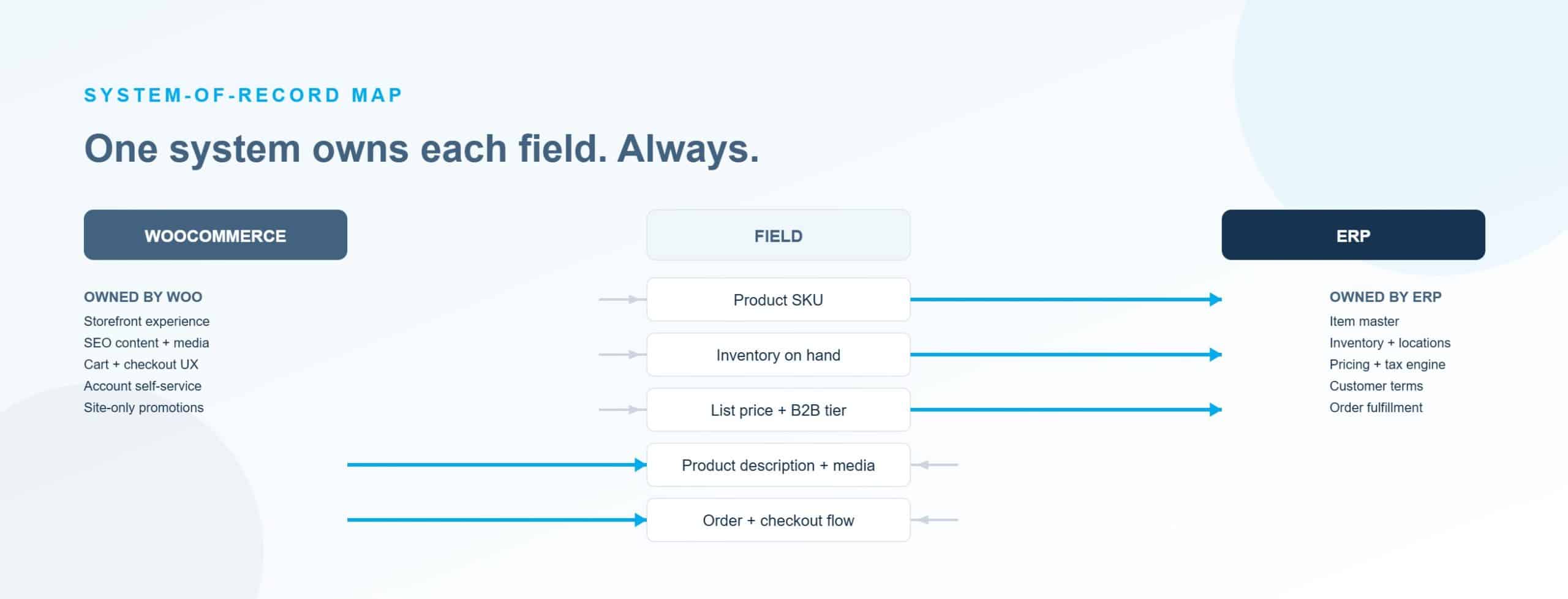
- Who owns inventory? The ERP. Always. WooCommerce displays what the ERP sends: it does not maintain its own stock counts independently.
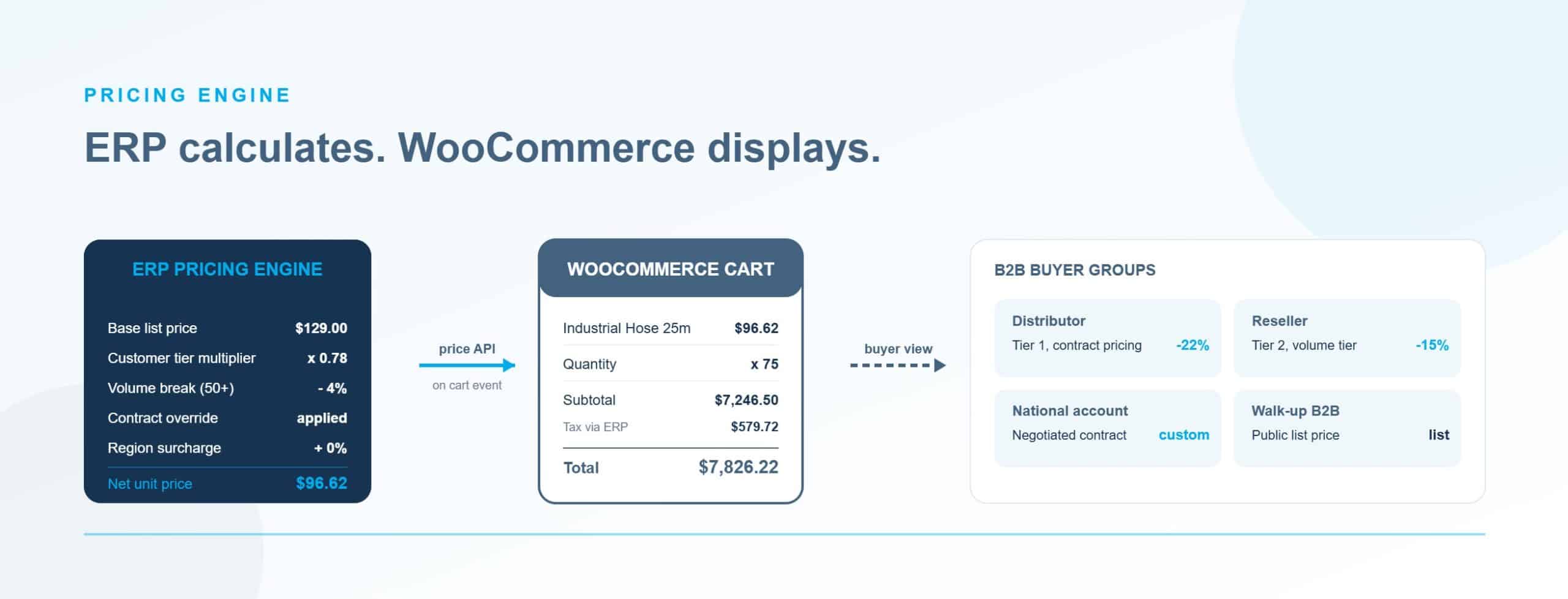
- Who owns pricing? The ERP. Even if WooCommerce displays the price, the source of truth lives in the ERP. More on this in Step 4.
- Who owns customer account data? The ERP owns account terms, credit limits, and payment terms. Your CRM or WooCommerce owns the marketing profile and email preferences.
- Who owns product catalog content? Descriptions, images, and specs are typically owned by your eCommerce team or a PIM, not the ERP item master. This is a common gap. Your ERP item description is rarely what you want in a customer-facing product listing.
Build a status translation table as a separate artifact. WooCommerce order statuses (pending, processing, on-hold, completed, cancelled) must map explicitly to ERP order statuses, and the reverse mapping must also be documented. Do not leave this as an assumption.
Step 3: decide what syncs in real time and what doesn’t
The default assumption in most integration projects is batch sync, push inventory from the ERP to WooCommerce nightly or hourly. For B2B manufacturers, this default is wrong for the data objects that matter most.
Here’s what goes wrong: a key account places a $50,000 order at 10am on inventory that was accurate at midnight. Your inside sales team allocated that stock to a wholesale order at 8am. Your WooCommerce store confirms the web order on inventory that no longer exists. The ERP rejects the fulfillment. The customer gets a delayed shipment notice. That’s not a technology failure, it’s a sync architecture failure.
Not everything needs to be real-time. Use this framework to decide by object:
|
Data object |
Recommended frequency |
Notes |
|---|---|---|
|
Inventory levels |
Near-real-time (sub-5 minutes) |
Webhook on inventory change if your ERP API tier supports it |
|
Order creation |
Real-time |
Order hits ERP immediately on WooCommerce confirmation |
|
Fulfillment status / tracking numbers |
15–30 minute batch |
Acceptable delay; customer tolerance is higher here |
|
Product catalog (descriptions, specs) |
Daily batch or triggered |
Low urgency; changes are infrequent |
|
Customer-specific pricing |
Near-real-time or batch |
Near-real-time if contracts change frequently; batch if quarterly updates |
|
Customer account data |
Event-driven |
Trigger on account creation or status change |
The batch trap in manufacturing: some legacy ERP API tiers don’t support webhooks. They only offer scheduled batch exports. Teams that discover this mid-implementation face a choice between overselling risk (stick with batch) and expensive custom polling infrastructure (scheduled API calls every few minutes). Confirm your ERP’s API tier and webhook support during connector evaluation, not after you’ve signed a contract.
A slow or inaccurate inventory sync also compounds high-SKU WooCommerce performance issues that many manufacturers already face before the integration is added. If your store is pulling inventory data on every page load from a slow connection, you’ve turned a sync latency problem into a customer-facing speed problem.
The Shopify Enterprise B2B integration guide sets a target of sub-5-minute inventory sync latency and a 97% inventory accuracy threshold as the baseline for a functioning B2B integration. Those are useful benchmarks to set pre-launch, not post-incident.
Step 4: make the ERP your pricing engine
WooCommerce natively supports one regular price and one sale price per product. That’s the entire native pricing capability. B2B manufacturers typically run something more complex: customer-specific negotiated rates, volume tiers, contract pricing with expiration dates, price group hierarchies across Wholesale, Distributor, OEM, and Retail tiers, and currency-specific pricing for international accounts.
The wrong approach, and the most common one, is to stack WooCommerce pricing plugins: a wholesale plugin here, a role-based pricing plugin there, a quantity discount plugin on top. These plugins don’t know what’s in your ERP. When a contract changes in the ERP, the WooCommerce plugin still shows the old rate. A distributor invoiced at $85 per unit sees $92 in their cart. They call their sales rep. The rep manually overrides. This happens for every contract change, indefinitely.
The WP Clan’s analysis of WooCommerce B2B pricing architecture confirms that the correct approach is to make the ERP the pricing engine: middleware queries the ERP for customer-specific pricing when an authenticated user views a product or adds to cart, caches by customer ID and SKU with a 15-minute TTL, and verifies at checkout to prevent stale pricing from being charged. WooCommerce displays and enforces ERP prices: it does not store them independently.
This architecture decision must be made before connector selection. It cannot be added cleanly as a plugin after go-live. B2B pricing architecture is one of the most consistently underestimated scopes in WooCommerce B2B builds, teams find out how complex it is when they’re already mid-integration and the connector they selected doesn’t support it.
If you’re on Microsoft Dynamics 365 Business Central, the Sales Price hierarchy (customer-specific rates → price groups → campaigns → MSRP) must be fully mapped before integration design begins. Any gap in that mapping means B2B customers see wrong prices at checkout, which is a trust problem, not just a technical one.
Choosing your connector: three approaches
With item master reconciliation, data mapping, sync architecture, and pricing architecture settled, connector selection becomes a narrower decision. Here’s the framework by use case complexity.
Pre-built connectors
Pre-built connectors are the right starting point for standard data flows with moderate B2B requirements. The mature options include DCKAP Integrator (purpose-built for distributors on Epicor P21), Commercient SYNC (150+ ERPs including SAP Business One, SYSPRO, and Sage), APPSeCONNECT (SAP B1, SAP S/4HANA, Dynamics 365 BC, NetSuite), and BCWooCommerce (Business Central).
For distributors running Epicor P21, a purpose-built connector cuts integration scope significantly compared to custom development: the data model assumptions are already matched to distributor workflows. That’s where integration services for distributors using pre-built connectors save the most time.
The failure mode to watch: pre-built connectors assume clean item masters and standard field structures. They don’t handle custom pricing logic, partial shipment workflows, or credit hold enforcement without additional configuration, sometimes significant additional configuration. Before committing, run your five most complex B2B order scenarios against any connector in a demo environment. If it fails three of five, you’re looking at custom development on top of a connector that wasn’t designed for it.
iPaaS middleware
iPaaS makes sense when you’re connecting more than two systems, ERP + PIM + WMS + WooCommerce + a marketplace, or when you need centralized integration governance across multiple data flows. Options in this space include Alumio (low-code, two to four week deployment claims), Celigo (strong NetSuite connector ecosystem), and Boomi (enterprise-grade).
The caution for mid-market manufacturers: iPaaS total cost of ownership for a two-system integration (one ERP to one WooCommerce store) can reach $500,000 or more over several years when you include licensing, integrator fees, and ongoing maintenance. If that’s the scope, a purpose-built connector or custom integration is almost always the better choice. Evaluate based on your five-year system roadmap, not just the current project.
Custom API integration
Custom API integration is the right call when your pricing model, fulfillment workflow, or data structure falls outside what any pre-built connector was designed to handle. Complex B2B requirements, customer-specific pricing, partial shipments, backorders, drop-ship, credit limit enforcement, multi-warehouse routing, real-time available-to-promise checks, typically end up here.
Timeline for full deployment is 10–16 weeks. The main failure mode isn’t the build, it’s what happens after go-live when the integration team disbands and either WooCommerce or the ERP releases an API update. Assign an integration owner who remains accountable post-launch. WooCommerce custom development that includes this ownership handoff is significantly cheaper to maintain over time than one that doesn’t.
Cost and timeline: what to budget
The short timelines you’ll see from connector vendors, two to four weeks, four to eight weeks, represent connector setup only. They don’t include item master audit, data mapping workshops, or B2B edge case configuration. Teams that hit those timelines and skip the pre-integration work consistently spend the following six to twelve months cleaning up the consequences.
Timeline by scenario
|
Scenario |
Timeline |
|---|---|
|
Simple (pre-built connector, clean data) |
4–8 weeks |
|
Standard custom integration |
10–16 weeks |
|
Complex multi-system (ERP + PIM + WMS) |
3–6 months |
|
Industry median (all ERP projects, Panorama 2024) |
15.5 months |
Cost by approach
|
Approach |
Project cost |
Monthly ongoing |
|---|---|---|
|
Pre-built connector (simple, clean data) |
$15,000–$40,000 |
$500–$1,000 |
|
Complex multi-system integration |
$50,000–$150,000 |
$1,000–$2,000 |
|
Custom API integration (full) |
$10,000–$45,000+ |
$1,500–$5,000 |
Sources: Nopio 2026, Seota 2025, Panorama Consulting 2024 (cited via Shopify Enterprise Blog).
The cost drivers that inflate scope most consistently are pricing complexity (customer-specific pricing adds 20–40% to integration scope), the condition of your item master at project start, your ERP’s API tier, and the number of B2B edge cases, partial shipments, backorders, credit holds, PO number capture, drop-ship.
If your ERP is SAP Business One or Microsoft Dynamics 365 Business Central, the connector ecosystem is mature and well-documented. SAP and Dynamics 365 WooCommerce integration has more established options than most other ERP pairings, which reduces project risk and timeline. The pre-integration work is still required: the connector ecosystem maturity doesn’t change what your data needs to look like before you connect it.
If you’re planning the project and want to stress-test your timeline and scope assumptions, eCommerce solutions for manufacturers at Virtina include an integration scoping process that surfaces the cost drivers before the build starts, not after.
People also ask
Does WooCommerce integrate with ERP systems?
Yes, through REST API connections, pre-built connectors (Commercient, DCKAP, APPSeCONNECT), or iPaaS middleware (Alumio, Celigo). WooCommerce has no native ERP functionality. The integration must be built or configured. The hard part isn’t establishing the connection, it’s the data cleanup that needs to happen before you build it.
Which ERP works best with WooCommerce?
For mid-market manufacturers and distributors, NetSuite and Dynamics 365 Business Central have the most mature WooCommerce connector ecosystems. For wholesale distributors specifically, Epicor Prophet 21 with DCKAP Integrator is purpose-built for the use case. For smaller manufacturers, Acumatica or SYSPRO are strong options. QuickBooks Enterprise is typically outgrown once customer-specific pricing or multi-location inventory enters the picture.
How long does WooCommerce ERP integration take?
Connector setup alone: 4–8 weeks for a pre-built connector with clean data. A full integration including item master audit, data mapping, and B2B edge case configuration: 10–16 weeks. Multi-system integrations, ERP plus PIM plus WMS plus WooCommerce, typically run 3–6 months. The 2–4 week figures from iPaaS vendors don’t include the pre-integration data work.
What data syncs between WooCommerce and an ERP?
WooCommerce sends orders, customer data, and returns to the ERP. The ERP sends back inventory levels, product data, customer-specific pricing, fulfillment status, tracking numbers, and invoice or credit status. Direction and frequency vary by object, inventory and order creation should be near-real-time; catalog updates and fulfillment status can run on a batch schedule.
Conclusion
The connector you select matters far less than what you do before you select it. Item master reconciliation, explicit data mapping, sync architecture decisions, and pricing engine design are the four things that determine whether your WooCommerce ERP integration holds up under real B2B transaction volume, or becomes another rebuild project in eighteen months.
Start with the pre-integration sequence outlined here. Get the item master clean on your top-revenue SKUs first. Run the data mapping workshop before any connector vendor sees your requirements. Confirm your ERP’s API tier and webhook support. Settle the pricing architecture before you’re mid-build.
If you want a partner who has built these integrations for manufacturers and B2B distributors before, and who starts with the data work, not the connector demo, contact Virtina to talk through your specific stack.
Frequently asked questions
We have 8,000 SKUs in our ERP. How long does item master cleanup actually take before we start integration?
Budget 4–6 weeks with dedicated internal resources. Deduplication, UOM standardization, SKU alignment, and variant mapping for 8,000 SKUs is a real project, not a weekend task. Compress the timeline by starting with the top 80% of revenue SKUs. Don’t hold the entire integration hostage to the long tail, but don’t start connector selection until the high-volume items are clean. For a reference point: a 5,000-SKU distributor with a 14% duplicate rate faces a minimum of 116 hours of item record remediation at 10 minutes per record. That’s a month of work for one person before the connector conversation even begins.
Our ERP vendor says they have a WooCommerce connector. Can’t we just use that?
ERP-vendor connectors handle standard flows well, orders in, inventory out, basic customer sync. They rarely handle customer-specific pricing, partial shipment status, backorder logic, credit limit enforcement, or PO number passthrough without additional configuration. Before committing, test the connector against your five most complex B2B order scenarios in the vendor’s demo environment. If it fails three of five, you’ll be adding custom development on top of a connector that wasn’t designed for it, which typically costs more than starting with the right tool.
Should inventory sync be real-time or is nightly batch good enough?
For B2B manufacturers, near-real-time (sub-5 minutes) is required for inventory. Nightly batch is only safe on a single channel with no wholesale orders competing for the same stock during business hours. If key accounts place large orders during the day, batch sync is a backorder incident waiting to happen. Fulfillment status and tracking numbers can run on a 15–30 minute batch, customer tolerance for tracking update delays is much higher than for inventory accuracy. Check your ERP’s API tier for webhook support during connector evaluation, not after you’ve committed to an architecture.
We already have a WooCommerce store and an ERP running in parallel. Does the pre-integration checklist still apply?
Yes, and it’s more important than for a greenfield setup. Existing stores consistently have diverged product data: marketing has changed product names, the ERP has issued new item codes, SKUs no longer match. Running item master reconciliation before adding a connector to an existing store prevents the connector from cementing those existing mismatches into automated workflows. Mid-integration audits find the worst data quality problems in stores that have been running without a connector for more than a year.
What’s the real difference between a pre-built connector and custom development for a manufacturer with complex needs?
Pre-built connectors get you live faster and cheaper for standard use cases. Custom development is required when your pricing model, fulfillment workflow, or data structure falls outside the connector’s design assumptions. A useful test: list your five most complex B2B scenarios, multi-tier pricing, partial shipments, credit holds, drop-ship, PO numbers. If the connector handles three of five, assess whether the remaining two are dealbreakers. If they are, plan for custom development from the start. Retrofitting custom logic after go-live on a pre-built connector costs more than building it correctly initially.
How do we handle customer-specific pricing from our ERP in WooCommerce?
The ERP must remain the pricing engine. When an authenticated user views a product or adds to cart, the integration queries the ERP for that customer’s specific pricing. Cache by customer ID and SKU with a 15-minute TTL to avoid query overhead on every page load. Verify pricing at checkout against the ERP to catch stale cached prices before they’re charged. Do not replicate ERP pricing rules in WooCommerce plugins, two disconnected pricing systems means every contract change becomes a manual reconciliation task across both systems. That operational cost compounds with every new customer contract you sign.
Our IT team wants to use iPaaS (Boomi or MuleSoft). Is that right for a mid-sized manufacturer?
iPaaS makes sense when you’re connecting three or more systems, ERP plus PIM plus WMS plus WooCommerce plus a marketplace, or when you need centralized governance across many integrations. For a mid-market manufacturer ($50M–$250M) connecting one ERP to one WooCommerce store, iPaaS often adds licensing and maintenance cost without adding meaningful capability. Purpose-built connectors (DCKAP, Commercient, APPSeCONNECT) are typically faster and cheaper for a two-system integration. Evaluate based on your five-year system roadmap, not just the current project, to make sure you’re not over-engineering now or under-engineering for what’s coming.
We integrated 14 months ago and it’s been a mess, constant errors, wrong inventory, pricing disputes. Rebuild or fix?
Start with an error log audit before making that call. Categorize the last 30 days of sync failures by type. If 70% or more are item master mismatches and UOM errors, a fix is likely possible, run the item master audit you should have done before launch, update the mapping tables, and rerun. If errors span pricing, order structure, and fulfillment status, and the connector doesn’t support your B2B edge cases, a rebuild with a better-matched connector will cost less over 24 months than continued patching. The audit takes about a week. It will tell you which direction to go, and it’s worth doing before you commit either way.