eCommerce migration | Updated July 2026
Summary
BigCommerce’s June 2026 Open Payment Provider Fee now charges B2B merchants 0.6% to 2% on every order outside its embedded payment list, including purchase orders. Migration to Magento Open Source is worth it above roughly $500K GMV, or when customization and ERP needs exceed BigCommerce’s ceiling. Below that, Magento’s Year 1 cost of $30,000 to $60,000 makes the math negative.
The migration runs through 7 phases, from pre-migration audit to post-launch monitoring. Four data types never move automatically: customer passwords, URL structure, product variants, and B2B account data. The biggest risk is SEO, since incomplete redirect mapping causes 15-30% organic traffic loss in the 90 days after launch.
Introduction
BigCommerce rewrote its pricing on June 1, 2026. Every merchant processing orders outside the embedded payment list now pays a fee per transaction: 2% on Core, 1% on Growth, 0.6% on Scale. For B2B stores running purchase order-based workflows, that fee applies to every PO. It did not exist before June 2026.
That change is driving a real migration evaluation across B2B manufacturers, distributors, and wholesalers. But migration to Magento is not the right answer for every store. This guide draws that line honestly.
If your GMV is under $500K and your B2B workflows are standard, this guide will tell you to stay put. If you’re above that threshold and hitting customization or API limits, it walks you through the 7 migration phases and the specific failure points that trip up most projects.
Table of Contents
- Why are B2B merchants leaving BigCommerce in 2026?
- Should you migrate to Magento: the honest decision framework
- What does a BigCommerce to Magento migration actually involve?
- What data won’t migrate automatically, and why it matters
- How do you protect your SEO through the migration?
- What does migration cost and how long does it take?
- How does Virtina run a BigCommerce to Magento migration?
- People also ask
- Conclusion
- Frequently Asked Questions
Why are B2B merchants leaving BigCommerce in 2026?
The main reason is BigCommerce’s June 2026 Open Payment Provider Fee, which charges B2B merchants between 0.6% and 2% on every order processed outside BigCommerce’s embedded payment list, including purchase orders.
The Open Payment Provider Fee and what it costs B2B stores
The fee applies by plan tier: Core at 2%, Growth at 1%, and Scale at 0.6%. This is new as of June 1, 2026. Before that date, BigCommerce did not charge transaction fees on PO-based orders or offline payment methods.
The cost compounds quickly. A B2B merchant doing $500K GMV on the Scale plan now pays $3,000 per year in transaction fees, plus a $3,588 annual plan subscription. That is $6,588 in pure platform fees before extensions or development.
The plan restructuring also tightened GMV thresholds. A merchant at $150K annual GMV who was on the Plus plan at $79 per month moves to Scale at $299 per month. That is a 278% platform cost increase before transaction fees apply.
The platform scale decline: what the numbers say
BigCommerce had approximately 47,000 live stores at its peak in 2022-2023. As of Q2 2026, that number stands at 36,855, an 11% year-over-year decline, per Storeleads Q2 2026 data.
In the most recent tracked 90-day period, 474 stores left BigCommerce while only 260 arrived, for a net loss of 214 merchants. The platform has reported three consecutive quarters of net customer losses at the enterprise tier.
This matters for one specific reason. A shrinking merchant base affects the breadth of available apps and extensions over time. Fewer merchants means fewer developers maintaining BigCommerce-specific integrations.
When the API and customization ceiling becomes the issue
Beyond fees, some B2B stores hit a technical ceiling. Limits reported by third-party sources document Core and Growth plans at 20,000 API calls per hour, and Scale at 60,000. Stores running real-time ERP synchronization across large catalogs can saturate these limits during peak hours.
BigCommerce also caps product variants at 600. Merchants with configurable products, such as industrial equipment with spec variations or medical devices with model variants, hit this wall regardless of plan tier.
Magento Open Source has no platform-imposed API rate limits or variant ceilings. Its only constraints are server capacity, which you control.
Should you migrate to Magento: the honest decision framework
Migration to Magento Open Source makes financial and operational sense above roughly $500K GMV. The case strengthens further when customization requirements exceed BigCommerce’s configuration ceiling or when your ERP integration needs direct database access.
When the migration math works in your favor
The clearest signal is GMV above $1M. At that scale, BigCommerce transaction fees compound year over year while Magento’s self-hosted infrastructure eliminates them permanently. For a fuller analysis of why Magento pays off at this scale, see Virtina’s coverage of Magento for long-term growth.
Customization is the second trigger. If your store needs multi-level approval chains, buyer-specific catalogs with 5,000+ SKUs, company account hierarchies, or ERP integrations requiring direct database access, migration is the right call.
Multi-store infrastructure is the third factor. Magento’s multi-store setup with a shared backend handles different catalogs and buyer segments more cleanly than BigCommerce’s multi-storefront offering at this scale. Score yourself against these criteria:
- GMV over $500K with PO-based ordering and growing transaction fee exposure
- Customization requirements beyond what BigCommerce’s app stack can configure
- ERP integration needing direct database access or a custom API architecture
- Multi-store or multi-buyer-segment catalog requirements
If you check two or more of these, migration warrants a serious evaluation. For context on where Magento sits relative to other platforms, Virtina’s eCommerce platform comparison covers the full four-way breakdown.
When to stay on BigCommerce
If your GMV is under $500K and your B2B workflows are standard, migrating to Magento this year will cost more than it saves. That’s the direct answer, not a caveat.
Magento Open Source Year 1 total cost of ownership typically runs $30,000-$60,000 for a small-to-mid store. At $500K GMV, the payback calculation comes out negative in Year 1. Stay on BigCommerce, tighten your app stack, and revisit when transaction fee exposure justifies the switch.
BigCommerce B2B Edition handles company accounts, custom pricing, quote management, net terms, and PO ordering natively. If those features cover your workflows, you don’t need Magento’s flexibility. Review Virtina’s guide to BigCommerce B2B Edition setup before making any replatforming decision.
Stores that need fast time-to-market should also stay put. A mid-market migration runs 12-24 agency weeks minimum. That timeline matters.
Magento Open Source vs Adobe Commerce: which tier?
Magento Open Source is free to download. Adobe Commerce carries a license cost of $22,000-$125,000+ per year depending on GMV tier. The question is whether the Commerce B2B module, with 15+ natively built workflows, is worth that license over building a comparable stack on Open Source.
For stores migrating primarily for customization and TCO, Open Source is the right starting point at under $5M GMV. Adobe Commerce is worth evaluating at $5M+ GMV when the native B2B module replaces a paid app stack you’re already running on BigCommerce. See Virtina’s breakdown of Adobe Commerce B2B features for a full list of what ships natively.
For B2B operations specifically, the Adobe Commerce B2B module at scale can replace several paid BigCommerce apps at once. The economics depend on your current app spend. Virtina’s Magento for B2B guide covers those native capabilities in detail.
What does a BigCommerce to Magento migration actually involve?

A BigCommerce to Magento migration runs through 7 phases: pre-migration audit, theme build, catalog migration, integration rebuild, B2B data configuration, staging QA, DNS cutover, and post-launch monitoring.
One important clarification before the phases: Adobe’s Magento Data Migration Tool is designed exclusively for Magento 1 to Magento 2 migrations. It requires a source Magento 1 database and cannot connect to BigCommerce. If you’ve seen it suggested as an option for this route, that information is incorrect.
For BigCommerce to Magento, you have three approaches: third-party migration tools such as LitExtension or Cart2Cart, manual CSV export and data transformation, or a custom API-based migration scripted by a development agency. Your catalog size and B2B complexity determine which approach fits.
A structured eCommerce migration checklist should be your starting document for any replatforming project. It covers pre-launch QA, redirect verification, and post-launch monitoring requirements. Virtina’s platform migration planning guide covers the broader strategic framework for replatforming decisions.
Phases 1 and 2: audit, catalog, and theme
Phase 1 is a 2-week audit. Document every page URL and map it to a Magento equivalent. Build your redirect map before writing a single line of code. Map your BigCommerce app stack to Magento extension equivalents. Missing an app replacement on launch day is one of the most common sources of post-launch chaos.
Phase 2 runs in parallel and takes 4-8 weeks. Build the Magento theme and migrate the catalog. Hyva is the recommended theme framework for performance: it generates leaner frontend output than Luma, which translates directly to better Core Web Vitals scores. Alongside the theme build, migrate catalog data via tool or API scripts, and transform variant data from BigCommerce’s single-row format to Magento’s configurable product and child simple SKU pairs.
Set up your hosting environment before build work begins. Magento 2.4.9, current as of May 2026, supports PHP 8.3, 8.4, and 8.5. It requires OpenSearch 2.x, Valkey 8, and Varnish 7.6 for a production-grade environment.
For stores under 5,000 SKUs with standard product data, tools like LitExtension are a viable option. LitExtension starts at $79, supports 140+ source platforms, and includes 60-day post-migration support. Cart2Cart supports 85+ platforms and suits smaller stores. For stores above 5,000 SKUs, complex B2B structures, or custom extension requirements, an agency API-based migration is the right approach. Tools move data. They don’t rebuild integrations or configure B2B architecture.
Phases 3-7: integrations, QA, and go-live
Phase 3 takes 2-4 weeks. Reconnect your ERP, CRM, payment gateways, and email platform. Each integration needs to be rebuilt to Magento’s API architecture, not merely reconnected. An ERP integration that ran on a BigCommerce app must be rebuilt as a Magento extension or via a middleware connector.
Rebuild your B2B configuration in parallel: customer groups, tier pricing, company accounts, and approval workflows. This step does not exist in a tool migration. It requires manual setup in the Magento B2B module.
Phase 4 is the launch sequence. Switch DNS, deploy 301 redirects at the server or CDN layer, and submit your new XML sitemap to Google Search Console immediately. Set up daily crawl error monitoring for the first two weeks. Virtina’s eCommerce replatforming service covers the specific QA stages this phase requires.
What data won’t migrate automatically, and why it matters
Four data types cannot be migrated automatically: customer passwords, URL structure, product variants, and B2B-specific data. Each requires a different manual reconstruction strategy.
The 4 non-automatable failure points
- Customer passwords. BigCommerce and Magento use incompatible hashing algorithms. Passwords cannot be transferred. Every customer must reset their password on first login. Plan a proactive reset email campaign for launch day to minimize support volume and buyer friction.
- URL structure. BigCommerce defaults to
/products/product-name/paths. Magento defaults to/product-name.html. Every URL must be individually mapped and 301-redirected. Any URL you miss loses its search ranking and link equity. - Product variants. BigCommerce stores variants as a single row. Magento requires a configurable product paired with child simple SKUs. Each row must be expanded and re-mapped. This is what makes large catalogs labor-intensive and why tools struggle above 5,000 SKUs.
- Historical orders. Import as read-only records only. No functional transaction replay is possible.
Rebuilding B2B data: the most underestimated work
Customer groups and tier pricing must be manually rebuilt in Magento’s Customer Groups and tier pricing configuration. There is no automated transfer path from BigCommerce.
Company accounts, shared catalogs, and negotiable quote histories from BigCommerce B2B Edition are not transferred by automated tools. They require full manual setup in the Magento B2B module. Budget 20-30% of total migration time for this work if your store has active B2B account structures.
This is where agency expertise pays for itself. A tool can move your product records. It cannot reconstruct your buyer hierarchy, approval rules, or customer-specific catalog visibility.
How do you protect your SEO through the migration?
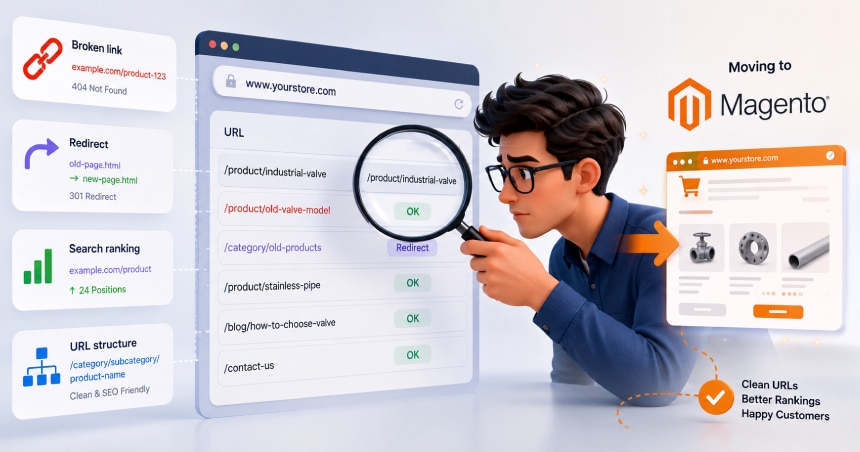
You protect your SEO by building a complete URL redirect map before migration starts, deploying server-side 301 redirects on launch day, and monitoring Google Search Console daily for two weeks after cutover.
Building the URL redirect map: before day one
A poorly managed migration causes 15-30% organic traffic loss in the 90 days post-launch. That range is documented across migrations where redirect mapping was incomplete or delayed. The fix is not complicated: it is work that cannot be skipped or deferred.
The map must cover every BigCommerce URL: products, categories, static pages, and blog posts. Use 301 redirects only. A 302 does not pass link equity. Never chain redirects: map A directly to C, not A to B to C. Chains slow crawling and dilute equity with each hop.
Watch for structured data loss. Magento requires separate schema configuration for rich snippets. Product schema, breadcrumb schema, and review markup from BigCommerce do not carry over automatically. Missing this step costs you rich snippet visibility. Virtina’s eCommerce SEO team handles schema as part of migration scope.
AI citation preservation: the 2026 migration KPI
A new performance indicator has emerged alongside organic traffic for 2026 migrations: AI citation preservation. If your BigCommerce pages are currently cited by AI Overviews, Perplexity, or similar tools, those citations are tied to specific URLs.
Migration without complete redirect coverage breaks those citations. Unlike Google rankings, AI citations do not auto-recover on a predictable timeline. Target 95% or more of pre-migration AI citations retained within 60 days of launch.
Track this by monitoring AI search outputs for your brand and product terms before migration, then again at 30 and 60 days post-launch. Add it to your monitoring checklist alongside Search Console crawl errors.
What does migration cost and how long does it take?
Agency-led migration costs $5,000-$15,000 for small stores, $20,000-$50,000 for mid-market stores, and $75,000-$250,000+ for enterprise stores with complex B2B and ERP requirements.
Timeline and investment by store size
Store size | DIY with tools | Agency timeline | Agency Year 1 cost |
|---|---|---|---|
Small (under 500 SKUs, no custom B2B) | 2-4 weeks | 8-12 weeks | $5,000-$15,000 |
Mid-market (500-5,000 SKUs) | 4-8 weeks | 12-24 weeks | $20,000-$50,000 |
Enterprise (5,000+ SKUs, complex B2B/ERP) | Not recommended | 24-52+ weeks | $75,000-$250,000+ |
Agency cost ranges based on 2026 market data. Final project cost depends on catalog size, B2B complexity, and integration requirements.
The honest comparison: a BigCommerce merchant at $500K GMV on Scale pays $6,588 per year in pure platform fees before extensions or development. Magento Year 1 total cost of ownership for a small-to-mid store typically runs $30,000-$60,000. Break-even generally occurs in Year 2 for stores above $500K GMV that execute the migration correctly.
From Year 2 onward, Magento ongoing costs drop to 20-40% of Year 1. Hosting, extension renewals, and security patches replace the compounding SaaS fees. The self-hosted model eliminates transaction fees permanently.
Budget the post-launch phase
Allocate 20-30% of your migration project cost for the first 6 months post-launch. A migrated store is not a finished store on launch day.
That budget covers performance tuning, extension configuration, B2B workflow refinement, and the edge-case bugs that surface only under real traffic. Planning for this phase is accurate project scoping, not pessimism.
How does Virtina run a BigCommerce to Magento migration?
Virtina is a Magento Certified partner with 1,000+ client engagements across B2B and B2C eCommerce. When you work with Virtina on a BigCommerce migration, the project starts with a full pre-migration audit. Every URL is catalogued, every app replacement mapped, and every B2B data structure documented before build work begins.
The build phase addresses the 4 failure points proactively. Password reset campaigns are prepared for launch day. The URL redirect map is built from the audit, not reconstructed after cutover.
Variant data is transformed through scripted re-mapping, not manual entry. B2B account structures, customer groups, and tier pricing are rebuilt in the Magento B2B module during staging, not patched in after launch.
Post-launch support covers the critical 6-month window. Virtina handles Search Console monitoring, performance tuning, and B2B workflow refinement as your team adapts to Magento. To discuss your specific store, contact Virtina’s Magento migration services team.
People also ask
How long does a BigCommerce to Magento migration take?
Agency-led migration takes 8-12 weeks for a small store (under 500 SKUs), 12-24 weeks for a mid-market store (500-5,000 SKUs), and 24-52+ weeks for an enterprise store with complex B2B and ERP requirements.
DIY tools are faster but not recommended for stores above 5,000 SKUs or with custom B2B configurations. Timeline depends on catalog size, integration complexity, and B2B data volume.
Will I lose my SEO rankings when I migrate from BigCommerce to Magento?
You can protect your rankings with a complete URL redirect map built before launch. Deploy server-side 301 redirects on cutover day.
Poorly managed migrations cause 15-30% organic traffic loss in 90 days, but that outcome is avoidable with proper redirect planning and immediate Search Console monitoring after go-live.
Can I use the Magento Data Migration Tool for BigCommerce?
No. Adobe’s Magento Data Migration Tool is designed exclusively for Magento 1 to Magento 2 migrations. It requires a source Magento 1 database and cannot connect to BigCommerce.
For BigCommerce migrations, use LitExtension, Cart2Cart, manual CSV transformation, or a custom agency API-based migration script.
How much does a BigCommerce to Magento migration cost?
Agency costs range from $5,000-$15,000 for small stores to $20,000-$50,000 for mid-market stores and $75,000-$250,000+ for enterprise stores with complex B2B and ERP setups.
Magento Open Source Year 1 total cost of ownership, including hosting, development, and extensions, typically runs $30,000-$60,000 for a small-to-mid store.
What B2B data can’t be migrated automatically from BigCommerce?
Customer passwords cannot be migrated due to incompatible hashing algorithms between BigCommerce and Magento.
B2B-specific data, including customer groups, tier pricing, company account hierarchies, and shared catalogs, requires full manual rebuild in the Magento B2B module. Automated migration tools do not handle this work.
Conclusion
If your GMV is above $500K and you’re processing PO-based orders, the June 2026 fee changes matter to you. BigCommerce transaction fees now add $3,000 or more to annual platform costs at that GMV level. At that scale, migration to Magento Open Source is worth a serious evaluation. Add deep B2B customization needs or an API ceiling to that picture and the case strengthens further.
Migration is not simple. The 4 failure points, passwords, URLs, variants, and B2B data, trip up most projects that move too fast. A phased approach with proper pre-audit work, staging QA, and a planned post-launch support window makes the difference. A rushed cutover typically means a 90-day recovery instead of a clean go-live.
Frequently Asked Questions
Does migrating to Magento affect my existing customer accounts?
Yes, in one specific way: customer passwords cannot be migrated. BigCommerce and Magento use incompatible hashing algorithms, so every customer must reset their password on first login. Send a proactive reset email on launch day to reduce support friction. All other account data, including order history, billing addresses, and company assignments, transfers through the standard migration process.
What happens to my BigCommerce integrations (ERP, payment, shipping)?
Your integrations need to be rebuilt for Magento’s API architecture, not just reconnected. Magento uses its own extension framework, REST API, and GraphQL layer. An ERP integration that ran on a BigCommerce app must be rebuilt as a Magento extension or via a middleware connector. Plan for 2-4 weeks of integration rebuild work in Phase 3.
Should I choose Magento Open Source or Adobe Commerce?
Open Source is the right starting point for stores migrating primarily for customization and TCO control at under $5M GMV. Adobe Commerce is worth evaluating at $5M+ GMV when the native B2B module, which includes RFQ, negotiable quotes, multi-level approvals, requisition lists, and company account hierarchies, replaces a paid app stack you’re already running on BigCommerce. Compare your current app spend against the Adobe Commerce license cost ($22,000-$125,000+ per year) before deciding.
Is Magento harder to manage than BigCommerce day-to-day?
Yes, operationally. BigCommerce is a managed SaaS platform: security patches, infrastructure updates, and uptime are handled by BigCommerce. Magento Open Source requires your team or a managed hosting partner to handle those tasks. You own the server, which gives you full control, but also full responsibility. Factor in a managed Magento hosting partner at $1,200-$12,000+ per year as part of your ongoing operational plan.
What is the Hyva theme and why is it recommended?
Hyva is a Magento frontend theme framework that replaces the default Luma stack with a leaner build using Alpine.js and Tailwind CSS. It generates significantly less JavaScript than Luma, which improves Core Web Vitals scores and reduces Time to First Byte directly. For a B2B store where catalog page load affects buyer workflows, Hyva is the performance-first choice over the standard Magento theme.
Can I migrate product reviews and customer wishlists?
Product reviews can typically be migrated as read-only records using migration tools or custom scripts. Customer wishlists are more variable: migration depends on whether your BigCommerce setup stored wishlist data in a recoverable format. In most agency-led migrations, wishlists are migrated where data is clean and skipped where it isn’t. Historical orders are imported as read-only records with no functional transaction replay.
How do I handle the B2B pricing structures I’ve built in BigCommerce?
BigCommerce customer group pricing and tier pricing must be manually rebuilt in Magento’s Customer Groups and tier pricing configuration. There is no automated transfer. Shared catalogs from BigCommerce B2B Edition require full manual reconstruction in the Magento B2B module. Budget 20-30% of total migration time for this work on any store with active B2B pricing structures.
When should I NOT migrate from BigCommerce to Magento?
Don’t migrate if your GMV is under $500K and your B2B workflows are standard: company accounts, custom pricing, quote management, net terms, and PO ordering. The Year 1 Magento TCO makes the payback math negative at that scale.
Also don’t migrate if you need fast time-to-market, since a mid-market migration takes 12-24 agency weeks minimum. And don’t migrate if the June 2026 fee change is your only reason at lower GMV levels: the fee increase may cost less than the migration itself.