Summary
Your lead buyer logs in and waits six seconds for the catalog to load. Your team has brought in two agencies, both said the same thing: “WooCommerce just isn’t built for this scale.” You’re now looking at a $150K replatforming quote. Before you sign it, run the diagnostic in this guide. In most cases like this, the culprit is a Redis configuration that takes an afternoon to fix.
Introduction
Generic WooCommerce speed guides are written for B2C stores. They assume that nearly every visitor is anonymous, that full-page caching is both safe and effective, and that the primary bottleneck is front-end asset delivery. For your store, none of those assumptions are true.
Your authenticated buyers bypass full-page caching entirely, the server has to build every page fresh because pricing is tiered per customer, catalogs are visibility-filtered by role, and sessions carry live cart state. Layer in an ERP sync that fires on WordPress hooks, a B2B plugin running unindexed lookups across wp_postmeta, and a PHP-FPM configuration that was never tuned past its defaults, and you end up with a store that reads as “slow” but is actually “never optimized for the architecture it’s running.” The fix is almost never a new platform. Start with the 60-second audit below.
Table of Contents
- The 60-second self-audit
- Hosting and server configuration
- B2B caching: why page caching fails authenticated buyers
- Checkout failures and how to diagnose them
- Database bottlenecks: HPOS, autoload bloat, and Action Scheduler
- ERP sync: the most misdiagnosed culprit
- Fix in place vs. replatform: how to make the call
- People also ask
- Conclusion
- FAQ
The 60-second self-audit
Start by matching your primary symptom to a bottleneck. Open WebPageTest.org and run a logged-in user session. Install Query Monitor if it isn’t already active, flag any page that runs more than 100 queries as the first problem to solve.
Match what you see to the table below, then skip to the named section.
|
What you’re seeing |
Likely bottleneck |
Go to |
|---|---|---|
|
High TTFB (600ms+) on all pages, even uncached |
Hosting/server config or database |
Hosting or Database |
|
Slow for logged-in buyers only; anonymous visitors are fine |
B2B caching architecture |
B2B caching |
|
Checkout is the slowest page; product pages are acceptable |
Checkout-specific failures |
Checkout |
|
Admin order management takes 10-30 seconds |
HPOS not enabled or Action Scheduler bloat |
Database |
|
Speed degrades after ERP sync events or inventory updates |
ERP sync architecture |
ERP sync |
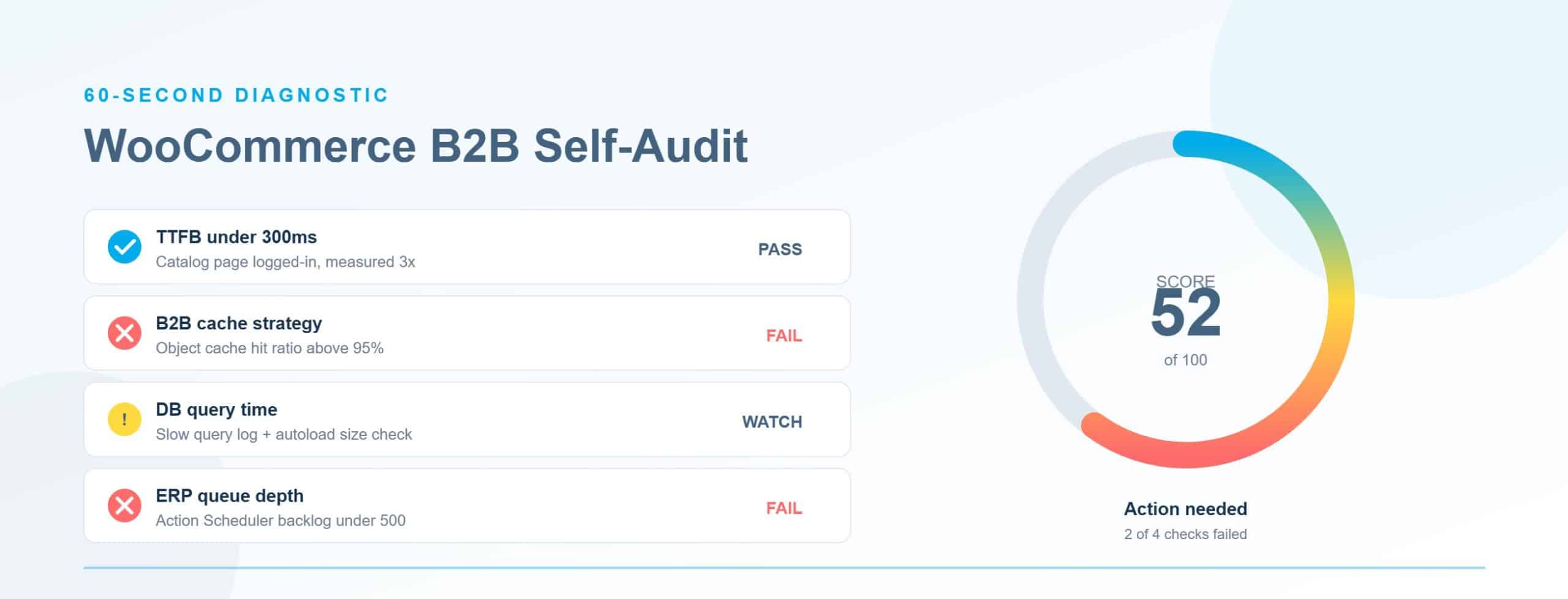
Don’t have a clear match? Run WooCommerce > Status > Tools > WooCommerce Health Check first, it surfaces misconfigured PHP memory limits, outdated extensions, and incompatible integrations before you dig into any individual bottleneck. The specific section you land in will tell you what to fix.
Hosting and server configuration
The most common root cause of high TTFB across all pages, logged in or not, is a server configured with MySQL and PHP defaults that were never tuned for WooCommerce. A VPS with correct configuration consistently outperforms shared “WooCommerce optimized” hosting by a factor of 10 or more. Here’s what actually needs to change.
InnoDB buffer pool. The default is 128MB. For any WooCommerce database over 500MB, MySQL is reading from disk on most queries, that’s the difference between a 2ms query response and a 200ms one. Set it to 70-80% of available RAM on a dedicated database server. This single change is typically the biggest TTFB win on stores that have never had it set.
OPcache. The defaults fail under a full WooCommerce plugin stack. Set memory_consumption to 128MB minimum (256MB for stores over 1,000 products), max_accelerated_files to 20,000+, and interned_strings_buffer to 32-64MB. The default 8MB is too small once you’re running more than a handful of active extensions.
PHP-FPM. Switch from pm = dynamic to pm = static for sustained B2B traffic. pm = dynamic fails under both steady load and sudden spikes, it’s designed for traffic that varies wildly, not the predictable, high-volume patterns of B2B order flows.
PHP memory limit. WooCommerce’s official minimum is 256MB. For stores with 1,000+ products and active B2B extensions, 512MB is the practical floor. Below that, large order processing silently fails with “Allowed memory size exhausted” errors that are hard to trace at the application level.
MySQL query cache. Disable it. Set query_cache_type = 0. MySQL deprecated it in version 5.7 and removed it in 8.0 for good reason: it serializes all writes through a global mutex lock. Many managed hosts running older MySQL 5.7 branches still leave it enabled by default.
Hosting tier. Bluehost, GoDaddy, and HostGator are inadequate for B2B WooCommerce, no configuration change compensates for their resource ceilings and shared infrastructure. The minimum acceptable starting point is premium shared hosting (SiteGround, A2). For any store running ERP sync and tiered pricing, a VPS on UpCloud or Vultr HF gives you the dedicated resources and configuration access that actually matter.
Once the server is tuned, the next issue is specific to B2B: your authenticated buyers are getting no caching benefit at all.
B2B caching: why page caching fails authenticated buyers
Here’s the problem your standard “enable caching” setup doesn’t solve: every logged-in B2B buyer sees individualized pricing, role-specific product visibility, and customer-specific catalogs. A full-page cache either serves the wrong content, a B2C visitor getting a B2B price tier, a wholesale buyer seeing retail pricing, or it bypasses on every authenticated request and delivers zero benefit.
Redis object caching is the right fix for B2B. Instead of caching complete pages, Redis stores the results of expensive database queries, role lookups, pricing calculations, visibility checks, at the object level, then serves them on subsequent requests within the same session. That’s where B2B stores get their caching wins, not from page-level cache hits.
Configure Redis correctly or don’t configure it at all. Set maxmemory-policy volatile-lru, this prevents Redis from evicting persistent cache keys under memory pressure. More critically, B2B eCommerce stores must ensure user-specific pricing data is scoped per user at the object level. Default Redis configuration does not do this, and a misconfigured setup causes pricing data to bleed across authenticated sessions. That’s not a performance bug, it’s a revenue bug.
If you’re on Nginx FastCGI cache, bypass rules must key on woocommerce_items_in_cart and user session cookies. Without those rules, checkout serves cached state and payment gateway tokens expire mid-transaction.
Plugin-specific configuration matters. For B2BKing, enable the Product Visibility Cache toggle (Settings > Other) and add the b2bking_use_simple_query_system and b2bking_flush_permalinks filters, these reduce per-request query load significantly. For WP Rocket users, the per-user cache feature is available but disabled by default, it needs explicit activation. Generic caching advice doesn’t cover any of this.
With your server and caching configured correctly, checkout deserves a separate diagnostic pass, it has its own failure modes.
Checkout failures and how to diagnose them
Checkout is where GMV is won or lost, and its failure modes are distinct from general page slowness. Improving TTFB won’t fix checkout if the actual problem is a misconfigured payment gateway or PHP memory exhaustion on a 200-line-item order. Across ecommerce generally, 70% of carts are abandoned due to sluggish checkout, and a 1-second delay reduces conversions by roughly 7%. For a systematic approach to closing that gap, see Virtina’s guide to eCommerce conversion rate optimization.
Custom pricing not reflecting at checkout is usually a filter priority problem. B2B plugins that hook into woocommerce_cart_item_price too late in the filter chain calculate pricing after the cart is already built. Use Query Monitor during a test checkout to audit the filter execution order and find where the pricing hook fires relative to the cart assembly.
Checkout page caching is a separate failure. Nginx FastCGI cache without a woocommerce_items_in_cart cookie bypass will serve stale checkout state, expire gateway tokens, and cause cart data mismatches. Roughly 15% of checkout-blocking issues trace to this misconfiguration, it’s easy to miss and easy to fix once you find it.
Payment gateway timeouts become a problem at the high AOVs typical of B2B orders. Multiple gateways loaded simultaneously add round-trip API calls. Disable any unused payment gateways and increase timeout thresholds in the settings of gateways you actively use.
PHP memory exhaustion on large carts surfaces as order processing failures for B2B orders with hundreds of line items when custom pricing calculations run per line item. Raise PHP memory to 512MB minimum and confirm it’s actually taking effect, some managed hosts cap it at the server level regardless of what you set in wp-config.php.
Session table bloat quietly degrades checkout query times. The wp_woocommerce_sessions table grows from bot traffic and expired sessions that never get cleaned up. Schedule a regular WP-CLI cleanup:
wp db query "DELETE FROM wp_woocommerce_sessions WHERE session_expiry < UNIX_TIMESTAMP()"Checkout’s issues are primarily PHP and caching problems. The database section below covers a different class of failures: those that hit admin operations and high-order-volume stores.
Database bottlenecks: HPOS, autoload bloat, and Action Scheduler
If your admin is slow and your team is losing 10-30 seconds per order lookup, HPOS is the most likely culprit, and the fix is free. For a deeper look at whether this migration makes sense for your store, see our guide to WooCommerce HPOS migration.
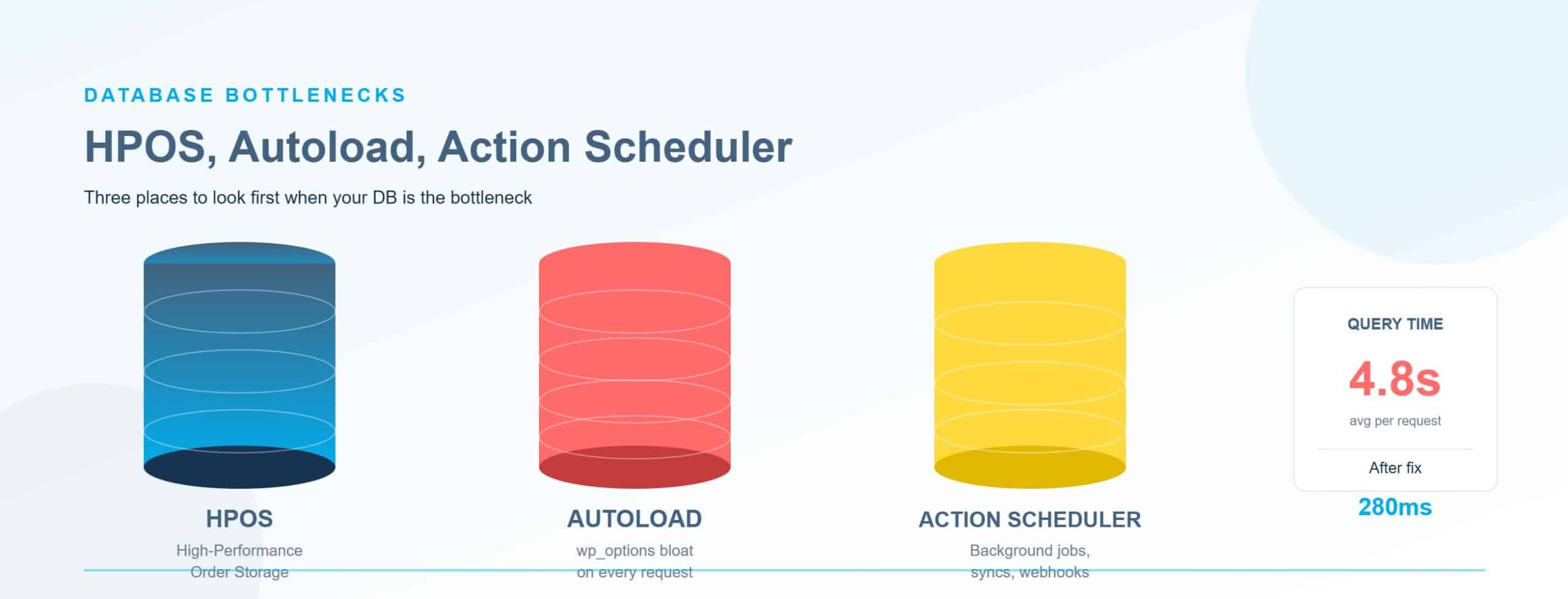
HPOS (High-Performance Order Storage) moves order data from wp_postmeta, where simple admin queries could require 500+ SQL joins at 50,000+ orders, into dedicated custom tables (wp_wc_orders, wp_wc_orders_meta). The performance difference is substantial: WooCommerce’s own benchmarks show 5x faster order creation, 40x faster backend filtering, and 80-90% faster admin operations for stores with 50,000+ orders. Checkout speed improves up to 35% for high-volume merchants.
HPOS is the default on new WooCommerce 10.x installs but must be explicitly migrated on existing stores. Run the migration on staging first. Older payment gateways and warehouse integrations can break, this is a real risk, not a theoretical one. The performance gains are worth it, but a broken payment gateway on a live B2B store is a worse problem than a slow one.
If you’re still on WooCommerce 6.x or 7.x, frozen at that version to avoid compatibility breaks, you’re also missing compounding free gains from WooCommerce’s recent updates. Version 9.8 alone reduced the slowest admin requests by up to 51.9% and cut the JavaScript bundle from 221KB to 60.2KB. WooCommerce 10.x reduced critical page-load times by up to 95% via async loading. Staying on 7.x to avoid a compatibility fix is not a neutral choice.
Action Scheduler bloat kills admin and cron performance silently. Completed jobs in wp_actionscheduler_actions are not deleted by default. High-volume B2B stores running ERP sync hooks, email automation, and recurring tasks accumulate millions of rows in this table, causing slow admin responses and backup timeouts. Add a retention filter to purge completed actions older than 30 days, then run a one-time WP-CLI cleanup.
wp_options autoload bloat is loaded on every single page request. The alert threshold is 1MB of autoloaded data. Many B2B stores running 40+ plugins are at 5-10MB. Query your autoloaded rows by size to find the largest entries:
SELECT option_name, LENGTH(option_value) FROM wp_options WHERE autoload = 'yes' ORDER BY LENGTH(option_value) DESC LIMIT 20Identify large entries and either deactivate the responsible plugin or set autoload to ‘no’ for non-critical ones.
Product meta at scale is a separate problem that HPOS does not fix. At 100,000 SKUs, wp_postmeta still runs into the millions of rows. Unindexed product searches become full table scans, adding the meta_value index cuts query time from 2 seconds to 20ms:
ALTER TABLE wp_postmeta ADD INDEX idx_meta_value(meta_value(191))For large-catalog search at real scale, offloading to ElasticPress or Algolia removes search from MySQL entirely. If your slowness correlates with ERP sync events rather than order volume, the database isn’t your primary problem.
ERP sync: the most misdiagnosed culprit
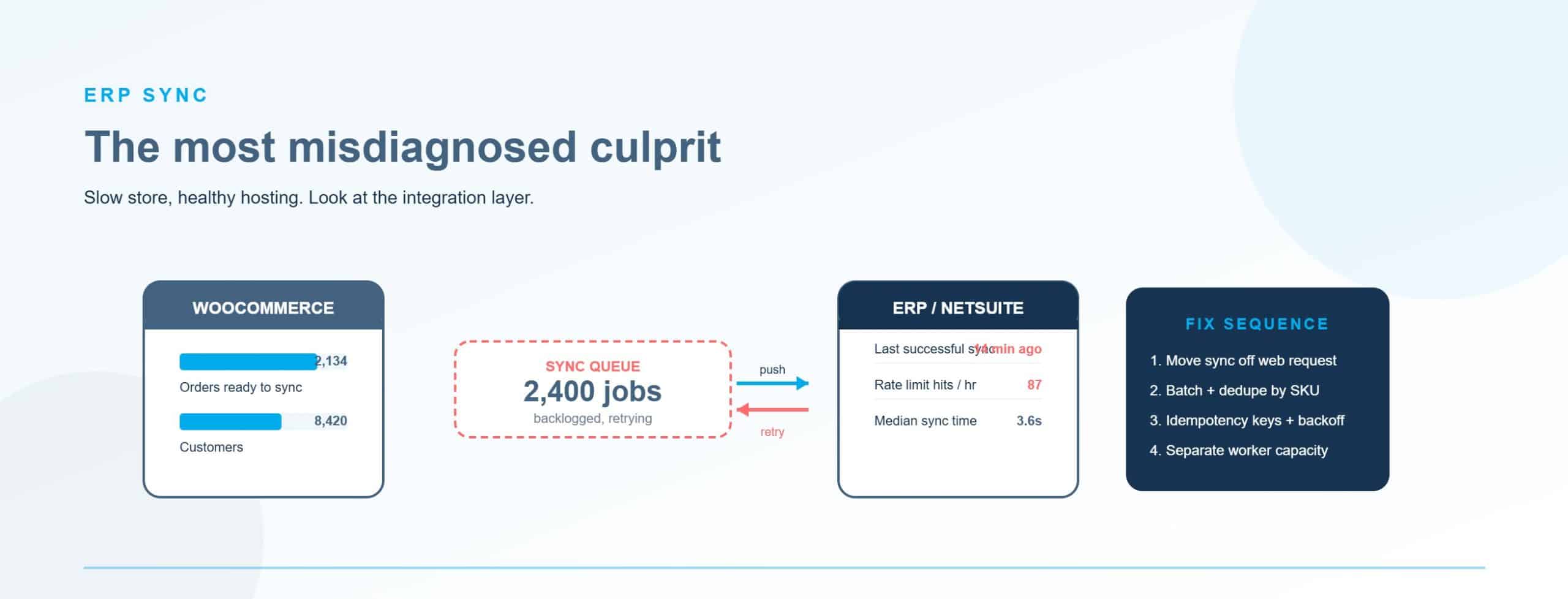
Here’s the misdiagnosis your team has likely made: the store slows down after an inventory update or price sync, and WooCommerce gets the blame. The store isn’t the problem. The eCommerce integration architecture is.
Plugin-based ERP connectors, for SAP Business One, NetSuite, Microsoft Dynamics, and Epicor P21, frequently execute sync operations via WordPress hooks during page load or checkout. That means a customer request triggers an API call to your ERP before the page returns. That per-request latency doesn’t look like an ERP problem in your monitoring, it looks like a slow WooCommerce page.
The documented failure modes are predictable: one-way sync breaks after a WooCommerce update, SKU mismatches create failed orders, and real-time pricing logic collapses so B2B customers see wrong prices during high-load sync windows. The root cause in every case is the same, hooks executing synchronously on customer-facing requests.
The fix is architectural, not a server upgrade. Switch from real-time/hook-based sync to scheduled batch sync every 5-15 minutes via system cron. This removes the per-request latency from customer-facing pages entirely. For teams not ready to rebuild the integration, this single change is typically achievable in days.
One caveat on WP-Cron: it’s unreliable under high traffic because it runs on page load. For B2B stores with ERP dependencies, replace it with a system cron job calling wp cron event run --due-now on a 5-minute schedule. WP-Cron doesn’t fire if no pages load, which is exactly what happens during off-hours batch sync windows.
Once the sync runs on a schedule rather than on-request, the right architecture is webhook-driven or batch sync with custom middleware handling throttling, queuing, and error recovery. That’s a different engagement than a configuration change, but it’s still not a replatform.
Fix in place vs. replatform: how to make the call
The legitimate signal to replatform your eCommerce store is a capability gap, not speed. If your store hasn’t had HPOS enabled, Redis configured correctly, PHP-FPM tuned, or a WooCommerce update applied in two years, you haven’t given it a fair shot. Replatforming in that state moves the problem; it doesn’t solve it.
Fix in place when:
- HPOS has not been enabled and your store has 50,000+ orders
- Your server is on shared hosting with default PHP-FPM and InnoDB configuration
- Redis object caching is not implemented, or it’s implemented without
volatile-lruand per-user scoping - B2BKing, WholesaleX, or Wholesale Suite are running without their known performance configuration applied
- ERP sync is executing in real time on WordPress hooks
- You’re running WooCommerce 7.x or earlier with no upgrade path tested on staging
Consider replatforming when:
- Your business requires multi-company account hierarchies with sub-account permissions and approval workflows, WooCommerce can replicate these, but not without custom development that accumulates technical debt
- Native RFQ/quote management, purchase order as payment, or customer-specific price lists are central to your buyer workflow, and the plugin stack to replicate them is fragile across updates
- ERP-grade audit trails and procurement workflow compliance are competitive requirements that your current implementation can’t meet
- The store has been fully optimized, HPOS enabled, Redis configured correctly, hosting upgraded, WooCommerce updated, and still can’t hit TTFB and checkout targets
The honest difference. Shopify Plus B2B and BigCommerce B2B Edition have company profiles, purchase approval workflows, native RFQ, and purchase orders as payment built into the platform kernel. No plugin conflicts, no per-update breakage risk. If your competitive differentiation depends on procurement workflow complexity rather than catalog and pricing flexibility, those platforms close the gap faster. That’s not a knock on WooCommerce, it’s just a use-case match. A manufacturer competing on catalog depth, complex pricing tiers, and ERP integration has a strong case to stay on WooCommerce and optimize it correctly.
People also ask
How do I know if my WooCommerce store is slow because of plugins or hosting?
Install Query Monitor and check the query count on a slow page, more than 100 queries per page is a plugin-level problem. If query count is reasonable but TTFB is still over 600ms, run a WebPageTest with no plugins active (use a staging environment), if TTFB drops significantly, a plugin is the culprit. If it stays high, the issue is hosting or server configuration.
Does WooCommerce HPOS really improve performance, and is it safe to enable on a live store?
Yes to both, with a caveat. WooCommerce’s own benchmarks show 5x faster order creation and 40x faster backend filtering for stores with 50,000+ orders. It’s safe to enable, but run the migration on staging first, older payment gateways and warehouse integrations can break, and that’s a real-world risk that requires testing, not just a checkbox.
What is the biggest performance mistake B2B WooCommerce stores make?
Treating the caching problem the same way B2C stores do. Full-page caching either bypasses on every authenticated request (delivering nothing) or serves the wrong pricing to the wrong buyer (a revenue bug). The correct approach for B2B is Redis object caching, scoped per user, with maxmemory-policy volatile-lru set. Most B2B stores never configure this correctly because every generic optimization guide skips it.
When should a B2B manufacturer replatform from WooCommerce to Shopify Plus or BigCommerce?
When the bottleneck is a capability gap, not a configuration problem. If your business needs multi-company approval workflows, native RFQ, purchase order as payment, or ERP-grade audit trails that WooCommerce can’t deliver without heavy custom development, and you’ve already fixed the configuration issues above, then the replatform conversation is legitimate. Don’t start it before you’ve run the diagnostic in this guide.
Conclusion
Most slow WooCommerce B2B stores have one specific, fixable failure that’s been misread as a platform problem. Run the 60-second audit at the top of this guide, find your primary bottleneck, and apply the highest-revenue-impact fix first, HPOS, Redis configuration, PHP-FPM tuning, or batch ERP sync. For most stores, those fixes are weeks of work, not a six-figure migration project.
If you want a second set of eyes on the diagnosis, our team works with B2B operators on exactly this, contact our eCommerce support team to talk through what you’re seeing.
Frequently Asked Questions
What is HPOS in WooCommerce and why does it matter for B2B stores?
HPOS (High-Performance Order Storage) moves WooCommerce order data out of wp_postmeta, a general-purpose table that requires hundreds of SQL joins per query when it contains 50,000+ orders, into dedicated custom tables built specifically for order data. For B2B stores with high order volumes, the difference is dramatic: WooCommerce’s benchmarks show 5x faster order creation, 40x faster backend filtering, and 80-90% faster admin operations. It’s the default on new WooCommerce 10.x installs but has to be explicitly migrated on existing stores. Before you run the migration on a live store, validate it thoroughly on staging, payment gateways and warehouse integrations that haven’t been updated in a while can break, and you need to know that before it affects live orders.
Why does my WooCommerce store load fast for guests but slow for logged-in buyers?
Because logged-in B2B buyers bypass full-page caching entirely. Every authenticated request requires the server to build the page from scratch, dynamic pricing calculations, role-based catalog visibility, session-specific cart state. Your anonymous visitors, by contrast, get a cached response that the server built once. The fix isn’t more server power; it’s Redis object caching, configured correctly to cache the results of expensive database queries at the session level rather than at the page level.
Can WooCommerce handle 100,000+ SKUs?
Yes, but infrastructure requirements scale with catalog size, and most standard hosting setups aren’t configured for it. Performance degradation typically starts around 10,000-20,000 products on standard shared hosting. At 100,000 SKUs, you need dedicated infrastructure (8-16 CPU cores, 32GB+ RAM, NVMe SSD), the meta_value index on wp_postmeta, and Elasticsearch or Algolia offloading search from MySQL. The platform ceiling is infrastructure-dependent, it isn’t a fixed number. If you’re hitting degradation at 15,000 SKUs on managed shared hosting, that’s a hosting problem, not a WooCommerce problem.
What’s the difference between page caching and object caching for WooCommerce?
Page caching saves a complete rendered HTML response and serves it to subsequent visitors without touching the database. That works well for B2C stores with mostly anonymous traffic. Object caching, typically Redis, saves the results of individual database queries (pricing lookups, role checks, inventory counts) and serves those cached query results instead of hitting MySQL again. For B2B WooCommerce, object caching is where the gains are because full-page caching is either unsafe (wrong prices served to wrong users) or bypassed entirely for authenticated buyers. The two approaches complement each other but solve different problems, and most B2B stores need to prioritize the object layer.
How do I know if my ERP integration is causing WooCommerce slowness?
Check whether slowness correlates with sync events. If your store slows down or throws errors after inventory updates, price syncs, or order pushes to your ERP, and returns to normal speed after the sync completes, the eCommerce integration is likely the culprit, not WooCommerce itself. Look in your New Relic or Datadog traces (or server logs if you don’t have APM) for external API calls firing during page-load transactions. Plugin-based ERP connectors for SAP, NetSuite, Dynamics, and Epicor P21 frequently execute synchronously on WordPress hooks. Moving to scheduled batch sync via system cron, even before rebuilding the full integration architecture, removes that latency from customer-facing pages.
What are the minimum hosting requirements for a B2B WooCommerce store?
The practical minimums: PHP 8.2+, 512MB PHP memory limit, MySQL 8.0 or MariaDB 10.6+, dedicated server or VPS (not shared hosting), InnoDB buffer pool set to 70-80% of available RAM, OPcache with memory_consumption at 256MB and max_accelerated_files at 20,000+, and PHP-FPM set to pm = static. For a store running ERP sync, tiered pricing, and 50,000+ orders, the realistic minimum is a VPS with 8GB RAM and NVMe SSD storage. Shared hosting, regardless of the provider’s WooCommerce marketing, cannot deliver the configuration access or dedicated resources a B2B store needs.
Is it risky to upgrade WooCommerce when I have custom plugins and B2B extensions?
The upgrade is risky without a staging environment and a plugin compatibility check. With staging, it’s manageable and increasingly necessary: stores sitting on WooCommerce 6.x or 7.x are compounding performance debt with every month they stay there. WooCommerce 9.8 alone made the slowest admin requests 51.9% faster and reduced the JavaScript bundle by 73%. WooCommerce 10.x reduced critical page-load times by up to 95%. The risk of not upgrading is not neutral, you’re leaving measurable free performance on the table while the gap widens.
What does Virtina look at first when diagnosing a slow WooCommerce B2B store?
We start with four things before we touch anything else: TTFB on both authenticated and unauthenticated sessions via WebPageTest, Query Monitor output showing query count and execution time per page, HPOS migration status, and the current hosting configuration, specifically InnoDB buffer pool, PHP-FPM process manager, and OPcache settings. Those four checks together tell us whether the problem is infrastructure (the most common), plugin architecture (second most common), or a genuine capability gap that configuration won’t solve. With 1,000+ clients including B2B manufacturers and distributors, one of whom grew revenue 22.5% in nine months after we rebuilt their WooCommerce performance layer, we’ve learned that most slow B2B stores haven’t been misconfigured once. They’ve never been configured for B2B at all. The fix, in almost every case, takes weeks, not months, and costs orders of magnitude less than a replatform.