Summary
WooCommerce High-Performance Order Storage (HPOS) moves order data out of wp_posts and wp_postmeta into dedicated wc_orders tables, delivering faster queries and cleaner admin filtering for stores processing thousands of orders. This guide walks through when the switch makes sense, how to test compatibility, a safe migration playbook with rollback, and the exact commands we run on client stores.
Introduction
If your WooCommerce store has been running for a few years, order lookups and admin searches have probably slowed to a crawl. The cause is rarely the server, it is the way WooCommerce historically stored every order inside wp_posts and wp_postmeta, shared tables that also hold every page, post, and custom field on the site. Once your order count climbs past a few tens of thousands, each admin query has to sift through a pile of unrelated content metadata just to return a list of recent orders.
High-Performance Order Storage (HPOS) is WooCommerce’s answer. It moves orders into purpose-built tables with typed columns and real indexes, and it has been the default for new stores since WooCommerce 9.0. For existing stores, though, flipping the switch is a decision, not an automatic upgrade. Some plugins still read from wp_postmeta, some custom code was written against the legacy model, and a botched migration on a live store is a bad day.
This guide is the migration playbook we actually use at Virtina when a client asks whether they should switch. We cover what HPOS changes under the hood, how to test readiness without breaking production, the step-by-step migration with rollback, and the signals that tell you it is safe to disable legacy storage for good.
Table of Contents
- Introduction
- What exactly is WooCommerce HPOS?
- Why would you switch to HPOS?
- Is your store ready for HPOS?
- How do you migrate safely?
- What can break during migration?
- How do you roll back if something goes wrong?
- Should you migrate now or wait?
- How Virtina handles HPOS migrations
- Frequently Asked Questions
What exactly is WooCommerce HPOS?
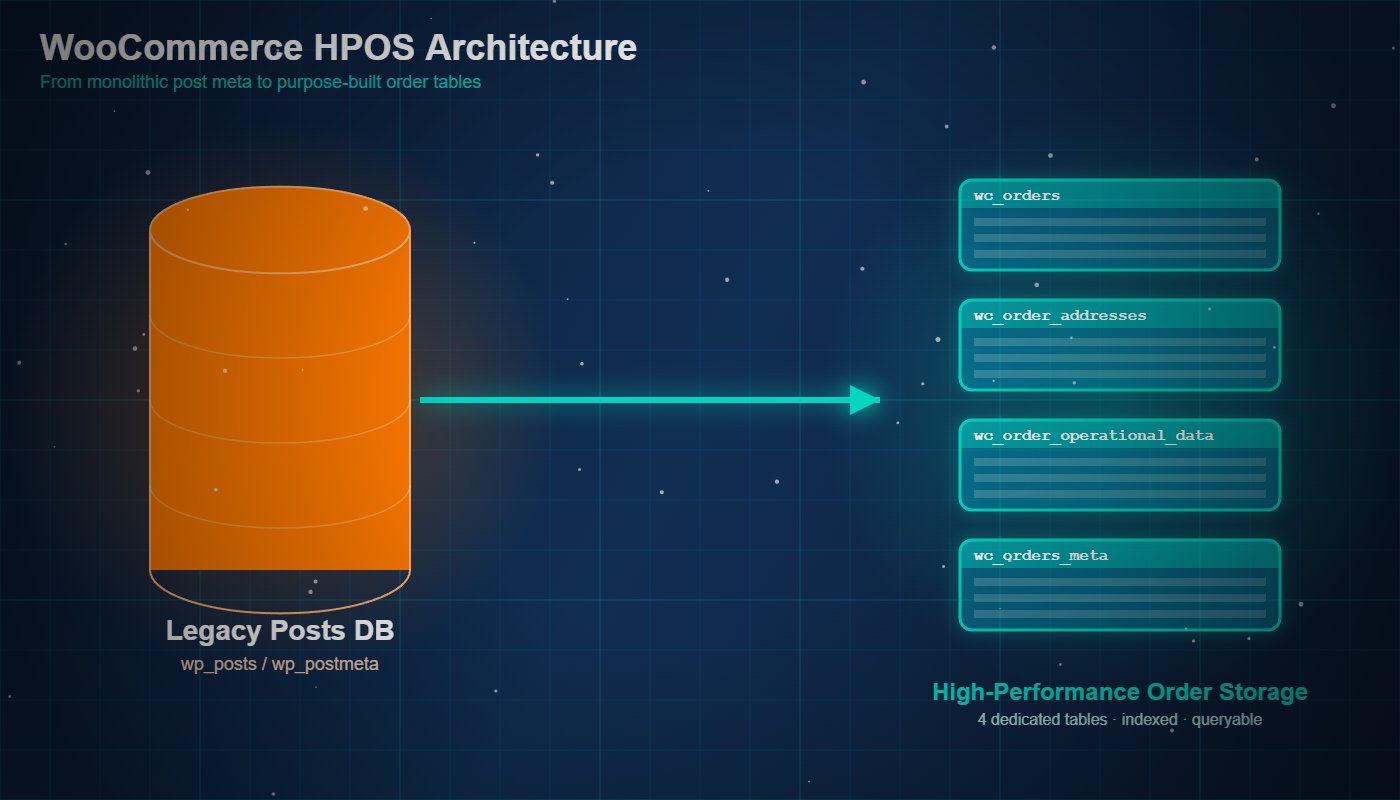
High-Performance Order Storage is WooCommerce’s order data architecture introduced as opt-in in version 8.2 and made the default for new stores in 9.0. Instead of storing each order as a row in wp_posts plus dozens of rows in wp_postmeta, HPOS writes orders to four purpose-built tables: wc_orders, wc_order_addresses, wc_order_operational_data, and wc_orders_meta.
Why did WooCommerce need a new storage model?
The legacy model worked fine when WooCommerce was a lightweight plugin. At scale, every order lookup meant a JOIN against wp_postmeta, a table that also holds content metadata for every post, page, and custom post type on the site. On stores with 100k+ orders, that shared table became the bottleneck for admin order search, reporting, and third-party integrations.
How is HPOS different under the hood?
HPOS keeps order fields in typed columns (indexed for status, customer, date) instead of serialised meta. Lookups that used to scan thousands of postmeta rows now resolve with a direct index read. The order edit screen, WooCommerce Analytics, and REST endpoints all hit the new tables directly.
Why would you switch to HPOS?
The honest answer: unless your order table is causing measurable pain, you are migrating for future-proofing rather than an immediate win. Stores that feel the difference on day one share three traits: high order volume, heavy use of admin order search and filters, and multiple plugins that read or write order data.
What performance gains are realistic?
On benchmarks WooCommerce published during the 8.2 rollout, admin order list queries dropped from seconds to milliseconds on stores above 50k orders. Filter-by-status and customer searches improved the most. Smaller stores (under 5k orders) rarely notice raw speed changes but do benefit from cleaner reporting joins.
Does HPOS help with third-party reporting tools?
Yes, but only if those tools read via the WooCommerce data layer (wc_get_orders(), CRUD classes, REST API). Tools that query wp_postmeta directly break in HPOS-only mode unless the site runs in compatibility mode. See the Google Analytics setup guide for an example of a reporting stack that works on both storage models.
Is your store ready for HPOS?
Readiness comes down to one question: does every plugin and custom code path that touches orders use the WooCommerce order CRUD, or does it reach into wp_postmeta directly? WooCommerce ships a compatibility checker inside the admin that scans active plugins and flags known incompatibilities.
Where do you find the compatibility checker?
Navigate to WooCommerce → Settings → Advanced → Features. You will see the High-Performance Order Storage section with a list of active plugins and a compatibility status next to each. Anything marked incompatible must be updated, replaced, or disabled before you flip the switch.
What about custom code in your theme or functions.php?
The checker cannot scan your custom code. Audit your theme and mu-plugins for direct references to get_post_meta, update_post_meta, or WP_Query using post_type => 'shop_order'. Replace these with wc_get_order() and $order->get_meta() so the code works on both storage models.
How big is the order volume you actually have?
Run this SQL to count orders: SELECT COUNT(*) FROM wp_posts WHERE post_type = 'shop_order';. Under 5,000 orders, the migration is effectively instant. Between 5k and 100k, expect a sync run of a few minutes. Above 100k, plan the sync to run overnight and budget for a maintenance window.
How do you migrate safely?
A safe migration has four phases: prepare, sync, verify, switch. Each phase is reversible until the final switch, which is where most teams introduce avoidable risk by skipping the verify step.
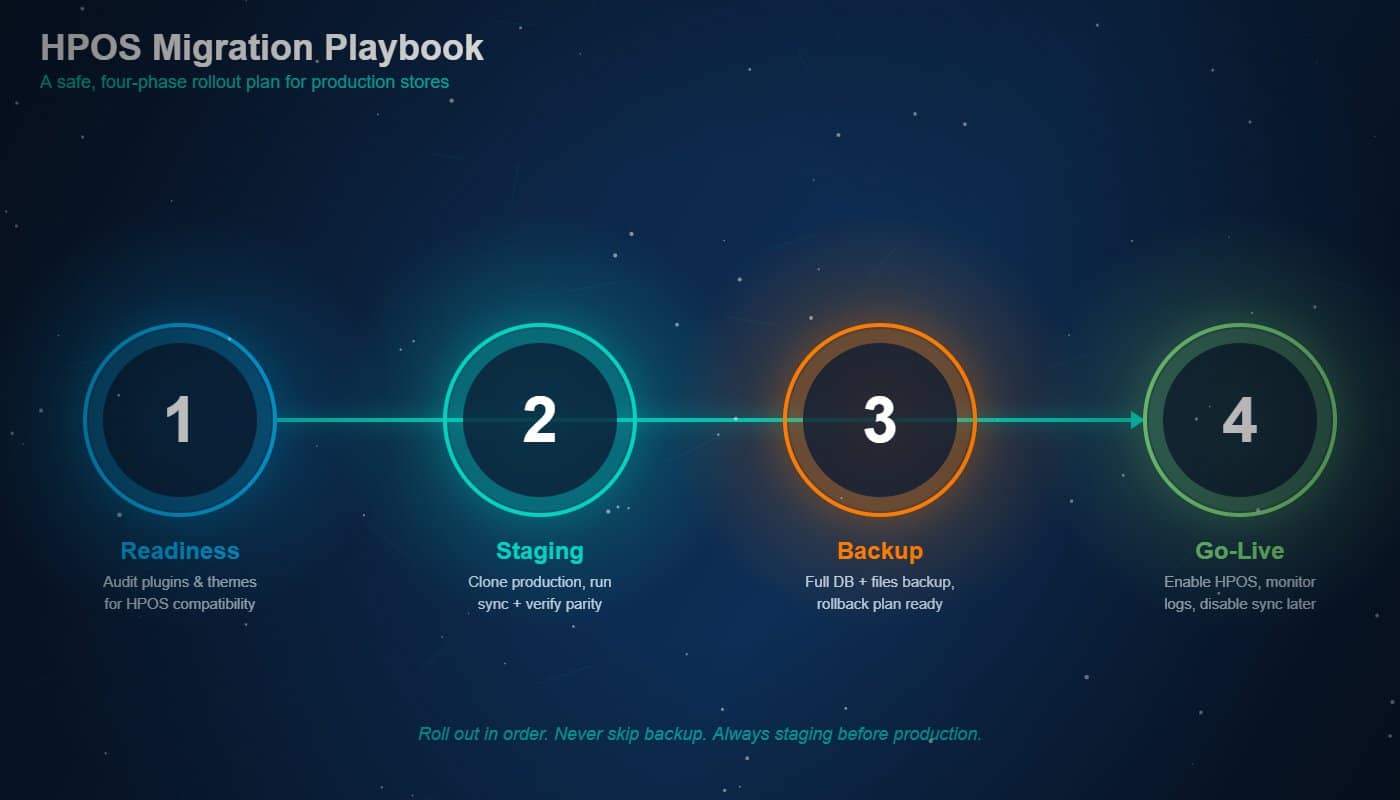
Phase 1: Prepare, what do you do before touching anything?
Take a full database backup. Update WooCommerce to the latest minor version. Update every active plugin. Run the compatibility checker and resolve every flagged item. Clone the production site to staging and rehearse the migration there first, never learn HPOS on a live store.
Phase 2: Sync, how do you copy data to the new tables?
Enable Compatibility mode first (writes go to both storage models). Then run the sync: wp wc hpos sync. This command copies every order from post meta into the wc_orders tables. For large stores, run it inside screen or tmux so a dropped SSH session does not kill the job.
Phase 3: Verify, how do you confirm the data matches?
Pull counts from both tables: SELECT COUNT(*) FROM wp_posts WHERE post_type = 'shop_order'; and SELECT COUNT(*) FROM wp_wc_orders;. Numbers must match exactly. Spot-check a handful of orders for totals, line items, and addresses. Place a fresh test order and confirm it lands in both tables while compatibility mode is still on.
Phase 4: Switch, when do you flip the storage default?
In Settings → Advanced → Features, set Order data storage to High-performance order storage. Leave Compatibility mode on for the first two weeks so writes still go to both tables. Monitor checkout, admin, and integrations. Only turn compatibility mode off after a clean observation period.
What can break during migration?
The failure modes cluster into three buckets: plugins that bypass the CRUD, custom reports that read post meta directly, and cron jobs that key off post_type = 'shop_order'. Each has a known fix, but you want to find them in staging, not in production on Black Friday.
Which plugin categories cause the most issues?
In our client migrations, the usual suspects are: legacy shipping and tax plugins that predate WooCommerce 3.0, custom-field-driven order management add-ons, and older subscription or bookings plugins that store metadata in non-standard ways. Modern plugins from the WooCommerce Marketplace are almost always HPOS-ready.
What about reports, exports, and accounting sync?
If a report reads wp_postmeta joins in raw SQL, it will return zero rows once HPOS is authoritative. The fix is either rewriting the query to use wp_wc_orders_meta, or rebuilding the report through the WooCommerce REST API. See Speed up WooCommerce without switching hosts for related query-layer tuning.
How do you roll back if something goes wrong?
Rollback is the reason compatibility mode exists. As long as compatibility mode is on, the post-meta copies stay in sync, so you can switch the storage default back to WordPress posts storage (legacy) with zero data loss. The window closes the moment you disable compatibility mode.
How long should you leave compatibility mode on?
Two weeks minimum for low-volume stores, four to six weeks for stores over 50k orders or with heavy integrations. The goal is to cover a full reporting cycle (weekly, monthly close) before removing the safety net.
What signals tell you it is safe to disable compatibility mode?
Checkout success rates unchanged from pre-migration baseline, reports reconciling with accounting, support tickets normal, no plugin errors in the log. If any of those are noisy, keep compatibility mode on and investigate.
Should you migrate now or wait?
There is no universal answer, but the decision collapses to three axes: store scale, plugin stack, and risk appetite during the current sales cycle. The matrix below summarises how we advise clients.
| Dimension | Migrate now | Wait a cycle |
|---|---|---|
| Order volume | 50k+ orders, queries feel slow | Under 5k, no speed complaints |
| Plugin stack | Modern, all HPOS-compatible | Legacy plugin with no HPOS support |
| Sales cycle | Quiet period, staging rehearsed | Peak season approaching |
| Custom code | Uses CRUD consistently | Heavy direct postmeta access |
| Team bandwidth | Ops available to monitor for 2 weeks | Holidays or launch crunch |
| Risk appetite | Comfortable with staged rollouts | Zero-change policy this quarter |
How Virtina handles HPOS migrations
On WooCommerce engagements, we treat HPOS as a scheduled, low-risk project rather than a plugin toggle. A typical engagement covers: full plugin and custom code audit, staging clone and dress rehearsal, change-window migration during the client’s lowest-traffic window, two-week observation with compatibility mode on, and a formal sign-off before we remove the legacy safety net.
The deliverable is not just a migrated database. It is a site where every integration has been exercised against HPOS and every team (support, finance, marketing) has signed off that their tools still work.
Conclusion
HPOS is not a feature you enable on a whim, it is an architectural change to how WooCommerce stores your most revenue-critical data. When you migrate with a rehearsed playbook, a verified sync, and a rollback window, the upside is a faster admin, cleaner reporting, and a forward-compatible store. When you skip the rehearsal, the same change turns into a checkout outage. If you want a second set of eyes on your store’s readiness or a done-for-you migration, talk to our WooCommerce team.
Frequently Asked Questions
Is HPOS the default for new WooCommerce stores?
Yes. Since WooCommerce 9.0, new installations enable HPOS by default. Existing stores stay on the legacy post-meta storage until an admin opts in.
Do I lose order history when I migrate?
No. The sync copies every order, customer note, and line item into the new tables. The legacy rows stay in place until you manually remove them, giving you a verified rollback path.
How long does the HPOS sync take?
Roughly 1,000 to 3,000 orders per minute on typical managed hosting. A 100k-order store completes in 30 to 90 minutes. Run it in a maintenance window for stores above 250k orders.
Will my existing reports still work after migration?
If they use the WooCommerce REST API or the wc_get_orders() function, yes. Reports built on raw wp_postmeta joins need to be rewritten to read from wp_wc_orders_meta or migrated to the REST API.
Can I run HPOS and legacy storage at the same time forever?
Technically yes via compatibility mode, but long-term it wastes disk and slows every write (two tables updated per order). Treat compatibility mode as a verification window, not a permanent state.
Does HPOS change the REST API response format?
No. The WooCommerce REST API abstracts the storage layer, so external integrations see the same JSON shape on both storage models.
Should a store under 1,000 orders migrate at all?
There is no urgency, but the migration is fast and risk-free at that scale. Doing it now keeps you aligned with the platform direction and avoids a larger cleanup later when the store has grown.