Summary
It's important to understand that no shipping method fits all.
Finding the ideal approach requires thorough research and identifying what suits your business model. Take the time to assess various options and experiment with different setups.
This will allow you to refine your shipping strategies and deliver an exceptional customer experience.
In today's fast-paced eCommerce world, delivering a seamless customer experience is crucial for fostering loyalty, satisfaction, and business growth.
Magento 2 offers excellent dependability and convenience with various shipping options, such as UPS, FedEx, Flat Rates, Free Shipping, and Table Rates.
An easy and improved delivery process can significantly boost sales, and real-time cost estimates during checkout enhance customer satisfaction.
However, challenges like high shipping costs, delivery delays, and complex logistics can deter customers.
Optimizing shipping is vital as it directly impacts customer retention and operational efficiency.
Offering options like free shipping or loyalty rewards can mitigate abandonment issues caused by unexpected costs, as over 61% of consumers cite these as reasons for transaction abandonment.
Let’s explore how to create custom shipping methods in Magento 2 and optimize your eCommerce operations for success.
Table of Contents
Overview: Magento 2 Shipping Methods
Magento's shipping methods fall into two main categories: Default Magento Shipping Methods and Third-Party Shipping Extensions.
These shipping methods are crucial in how businesses manage logistics and cater to customer preferences, ensuring smooth and customizable shipping experiences.
Default Magento Shipping Methods

Magento 2 offers various shipping options tailored to store owners' needs. These include flat rate, table rate, free shipping, and in-store delivery.
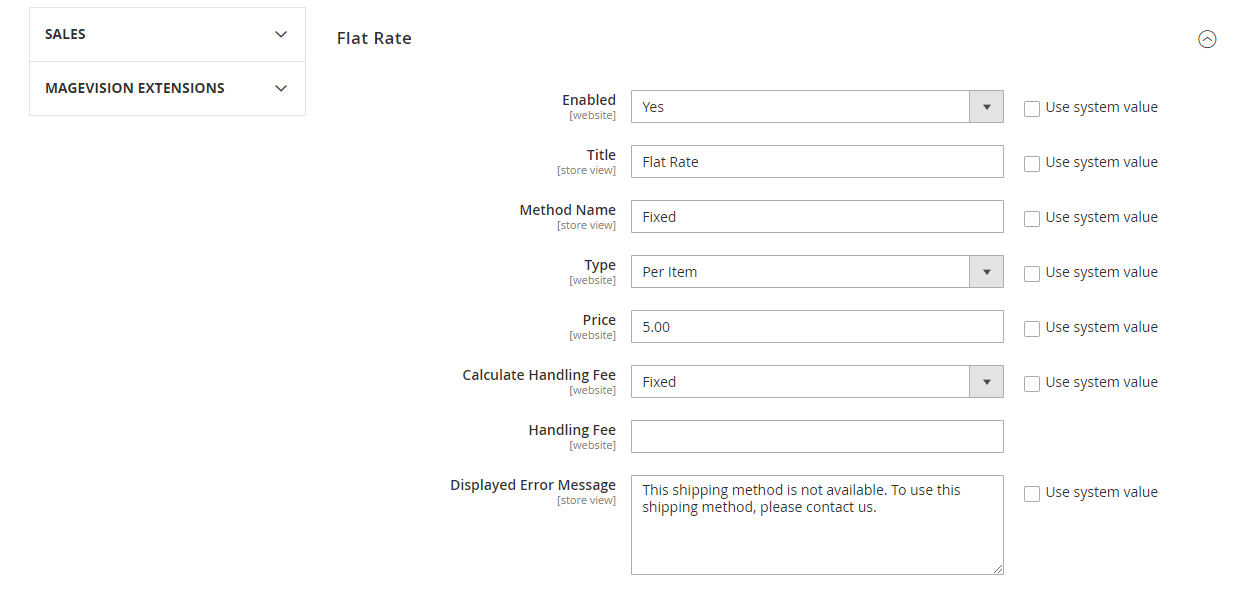
⇨ Flat Rate Shipping
With flat-rate shipping, retailers can charge the exact shipping for every order, regardless of weight or size. This approach is particularly beneficial for small businesses with a narrow product range.
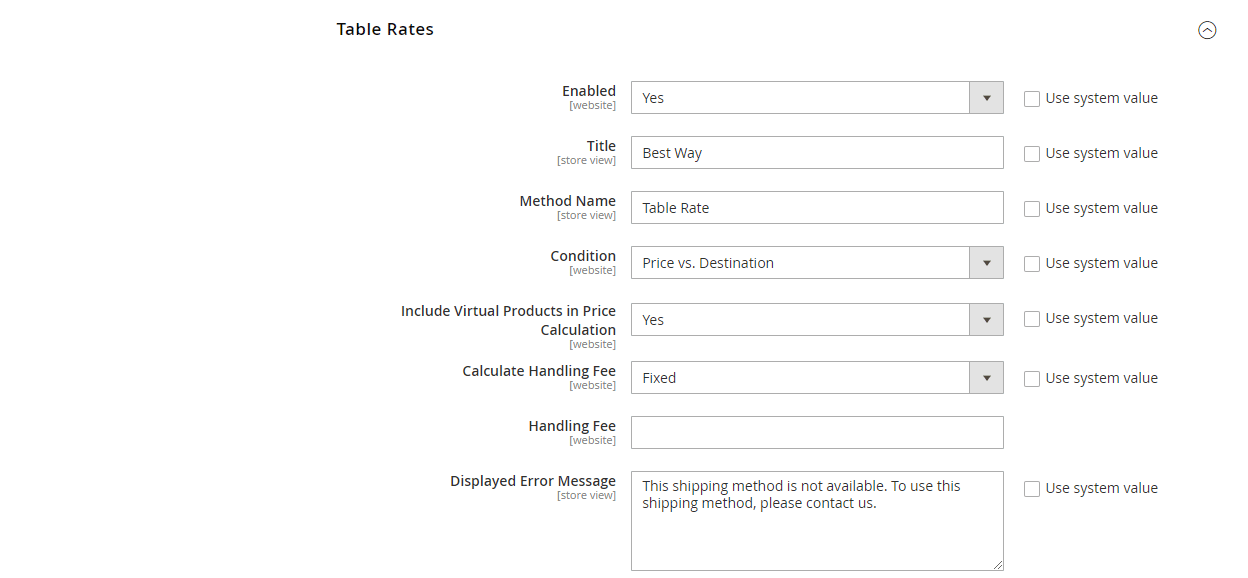
⇨ Table-Rate Shipping
The shipping cost varies depending on the destination, package weight, and order value.
Magento 2 shipping Table Rates let you set up different shipping rules tailored to specific products or customer segments, providing greater flexibility.
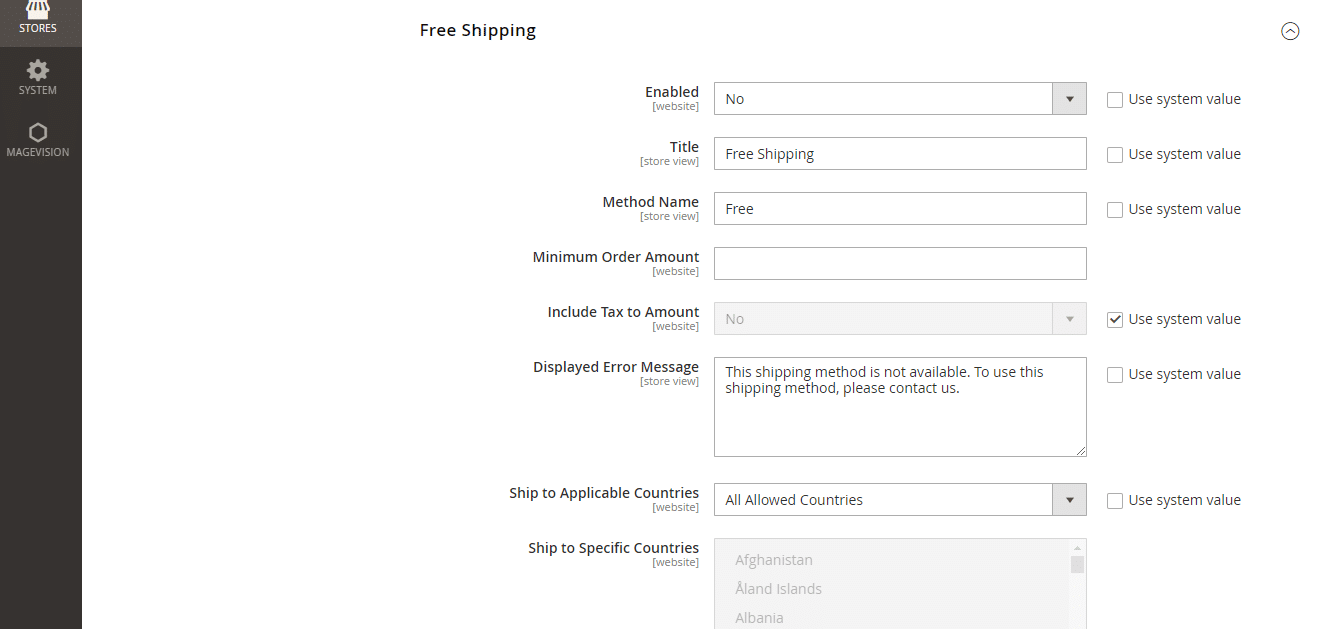
⇨ Free-Shipping
With Magento 2, store owners can target specific consumer segments or meet minimum order values to be eligible for free shipping.
By setting up a cart price rule, free shipping is activated automatically when specific requirements are met.
⇨ In-Store Delivery
In-store delivery allows customers to collect online orders from a nearby physical store.
This feature integrates with the Magento 2 eCommerce platform, enabling you to provide this convenient option to your valued customers.
Third-Party Shipping Extensions

Third-party shipping plugins can significantly improve your shipping processes.
These extensions let you create shipping labels quickly, set complex shipping rules, and automatically update tracking information.
They also provide customized delivery options based on your unique requirements.
Preparation Before Configuration
Determining the shipping point of origin in Magento 2 is essential before you begin configuring the default shipping methods.
Performing this step guarantees precise computations of product taxes and shipping charges for each of your shipments.
It is the foundation for your shipping strategy and affects how you handle delivery to different locations.

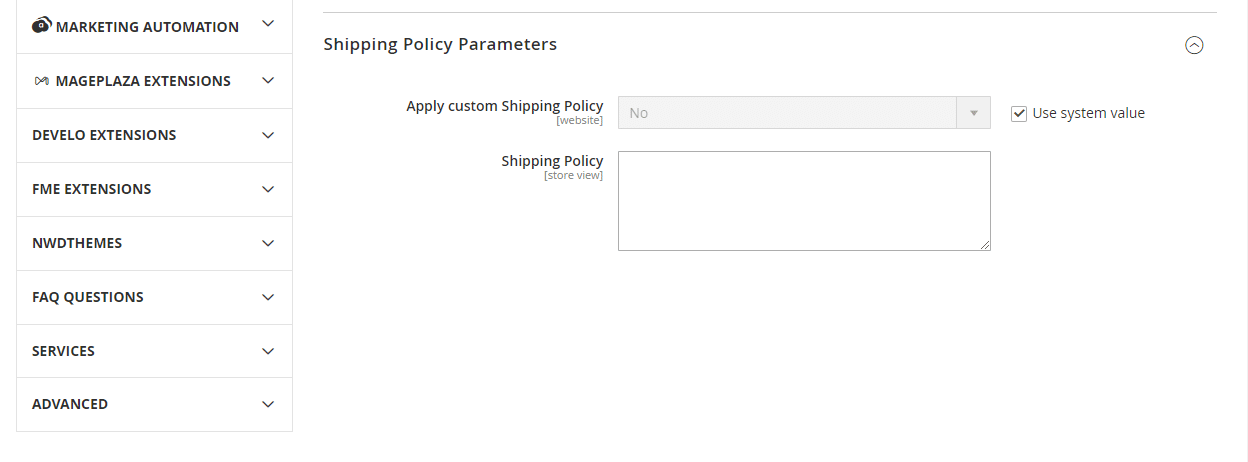
⇨ Shipping Policy
⇨ Flat Rate Shipping Method Configuration
⇨ Table-Rate Shipping Method Configuration
⇨ Table Rates
Export Table Rate Data
Import Table Rate Data
Free Shipping Method Configuration
⇨ Configure Free Shipping In UPS Carrier
⇨ In-Store Delivery Configuration

Next, create store locations:
Specify pickup details:
Make sure customers see In-Store Delivery at checkout: