Summary
Most ecommerce stores that think they need a rebuild actually need a redesign. Six factors, scope, platform limits, technical debt, budget, timeline, and risk tolerance, settle the question almost every time. This article walks through each one as a verdict, not a scorecard.
Introduction
A redesign that never fixes the real problem just delays the rebuild you actually needed. A rebuild nobody needed burns months and budget on a platform move you could have skipped.
Industry conversations often use rebuild and replatform almost interchangeably, and this article does too except where the distinction matters. Six concrete factors decide whether your store needs a redesign or a full rebuild. Each factor below takes a clear side, not a hedge.
Table of Contents
- Scope of change: if the fix lives in templates, call it a redesign
- Platform constraints: when the platform refuses the feature, call it a rebuild
- Technical debt: count the patches before you trust the page speed score
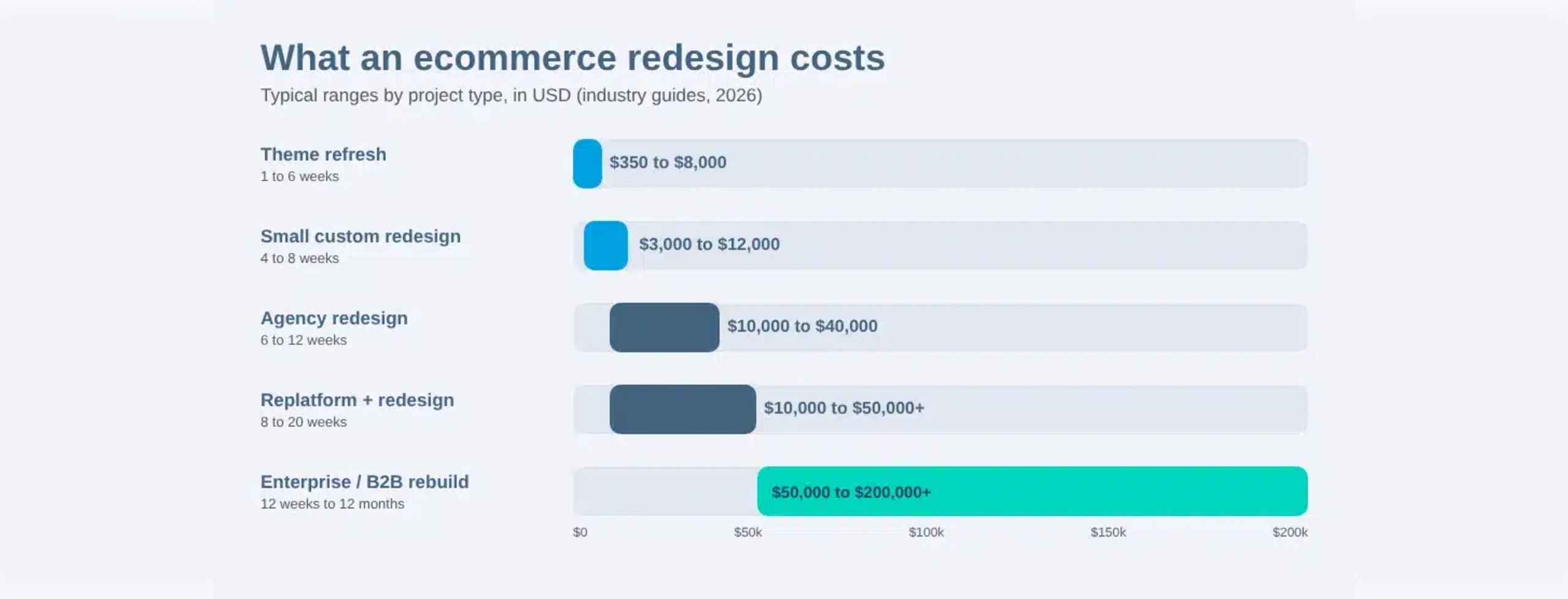
- Budget: a rebuild should run several times a redesign’s cost
- Timeline: don’t plan a rebuild if you can’t absorb months offline
- Risk tolerance: a rebuild gambles with revenue you already have
- What redesign and rebuild actually cost you, side by side
- What a redesign project involves versus what a rebuild does
- People also ask
- Conclusion
- Frequently asked questions
Scope of change: if the fix lives in templates, call it a redesign
If you can describe the problem as one page, one flow, or one component, you need a redesign. Scope of change is the first filter, before cost or timeline ever enter the conversation. A confusing checkout flow, an outdated product page, or a broken filter are template-level problems.
How to tell a template problem from a platform problem
A template problem shows up as a symptom on a specific page or step. A platform problem shows up everywhere a given limitation applies, no matter which template you touch. If a developer could fix it inside the current build, it is scope, not structure.
A jewelry retailer once lost sales on one confusing size-selector component, not the whole site. Replacing that single component fixed the problem in two weeks, no platform change required.
Platform constraints: when the platform refuses the feature, call it a rebuild
The platform forces a rebuild when it structurally cannot support a feature your business needs. Tiered B2B pricing, multi-warehouse inventory, and a checkout step the architecture cannot hold are rebuild signals. No redesign fixes a limitation baked into the platform’s data model or API.
Real platform-level limits that force a rebuild
Plugin conflicts stacked on an aging theme eventually make every change risky. A SaaS platform’s API ceiling blocks integrations no theme update can work around. An open-source core customized past the point of safely upgrading behaves the same way.
Comparing platforms before you commit matters, since a Shopify vs WooCommerce comparison clarifies which constraints you inherit. B2B sellers hit platform ceilings fastest, since complex pricing and account-based catalogs expose limits early. That is why B2B ecommerce development work often starts with an audit of what the platform can and cannot hold.
Technical debt: count the patches before you trust the page speed score
Technical debt matters more than how the site looks or scores on a speed test. The number of workarounds currently propping up the store predicts the next six months better than any score. A clean speed score can sit on top of a fragile, patched build.
What counts as technical debt on an ecommerce store
Plugin bloat is the most visible form, where each new plugin quietly conflicts with three others already installed. Duct-taped integrations, undocumented custom code, and abandoned A/B test remnants add weight nobody tracks. Each layer makes the next legitimate change slower and riskier to ship.
Look at your last ten store changes. Count how many needed a developer just to avoid breaking something else. If most of them did, technical debt, not design age, is the real constraint.
That same patch list raises migration risk later, since nobody fully remembers how the pieces fit together. A staging environment eventually stops catching every regression before launch.

Budget: a rebuild should run several times a redesign’s cost
Treat rebuild cost as a multiple of redesign cost, never as a close number. If a quoted rebuild costs about the same as a redesign, something in the scope is being underpriced. A full platform migration touches data, integrations, and testing a template refresh never does.
Why a close quote is a warning sign
A rebuild quote close to a redesign quote usually means scope was cut somewhere, not that the project got cheaper. Missing line items show up later as change orders, which is worse than paying for them upfront. Treat figures here as directional, since no reliable public data sets a fixed cost or project timeline for either path.
A detailed ecommerce website cost breakdown is a better starting point than any single vendor quote.
Timeline: don’t plan a rebuild if you can’t absorb months offline
A redesign fits inside a quarter, while a rebuild rarely does. Pretending otherwise is how rebuild timelines blow past their original deadline. Total cost of ownership should include the months your team spends on the project, not just the invoice.
Why timeline pressure is itself a valid reason to choose redesign
A business that cannot spare its product or engineering team for half a year has already answered the question. Timeline pressure is not a constraint to work around, it is a legitimate factor on its own. A rebuild that slips its timeline also slips its budget, almost without exception.
Risk tolerance: a rebuild gambles with revenue you already have
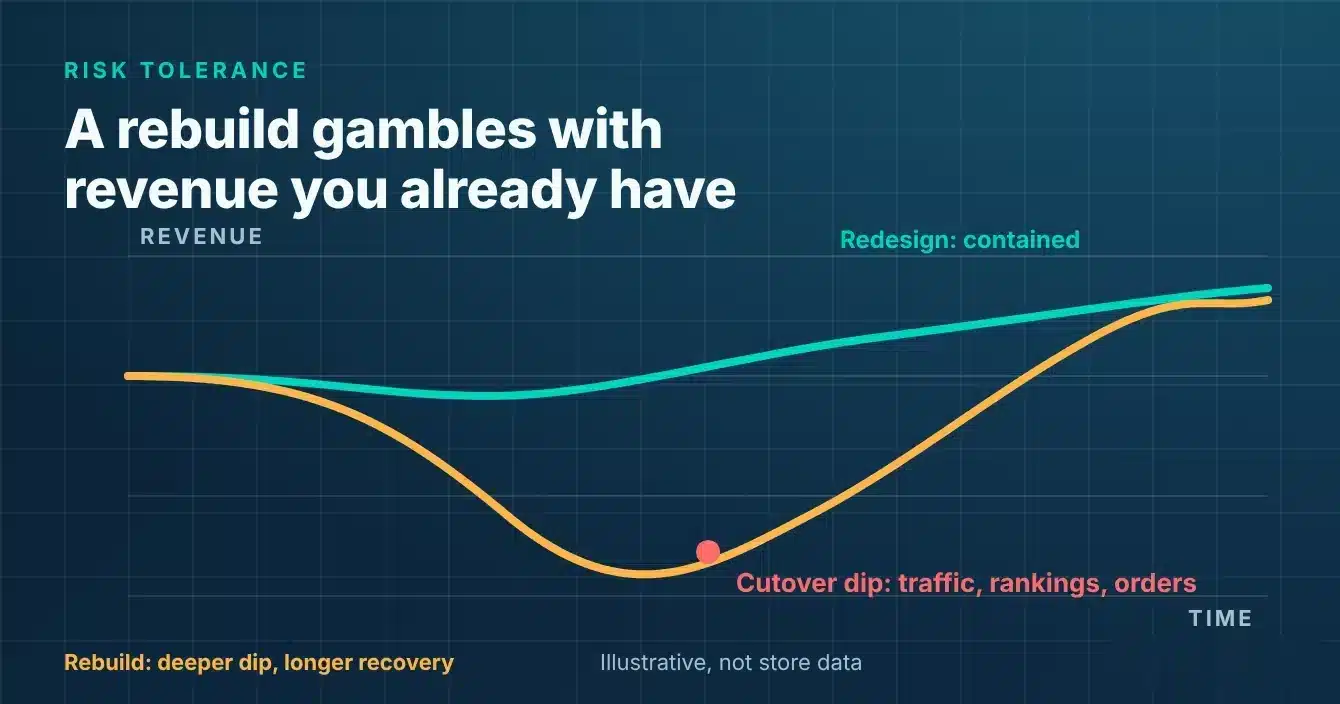
A rebuild puts existing revenue at risk through data loss, downtime, or broken integrations. Migrating a working store is not neutral, it risks GMV you are already earning. Only accept that migration risk once the current platform is already costing more than the risk itself.
When the other five factors point here
Scope, platform limits, technical debt, budget, and timeline all funnel into this one question: is the gamble worth it. If the first five factors point toward rebuild, risk tolerance is the final check, not a new argument. If they don’t, risk tolerance alone should stop you from rebuilding.
Store owners already weighing platform risk can see owners leaving Shopify for exactly this reason, not because WooCommerce is trendy. Ownership of your own platform is what keeps that risk inside your control.
What redesign and rebuild actually cost you, side by side
The table below lines up redesign and rebuild across the five factors that matter most. Use it as a sanity check against any quote you receive. It is not a fixed price list for your specific store.
|
Factor |
Redesign |
Rebuild / replatform |
|---|---|---|
|
Cost |
Typically around 1x baseline (illustrative) |
Typically 3x to 5x baseline (illustrative) |
|
Timeline |
Weeks to about 3 months |
4 to 8+ months |
|
Risk to existing revenue |
Low, contained to specific pages or flows |
Real risk: data loss, downtime, broken integrations possible |
|
What you keep |
Platform, data model, integrations, most SEO equity |
A clean slate, free of legacy codebase limits |
|
What you lose |
Legacy platform-level constraints stay in place |
Platform familiarity, plus integration work that must be redone |
Figures are directional, industry-typical ranges for illustration only, not sourced statistics, as of October 2026.
What a redesign project involves versus what a rebuild does
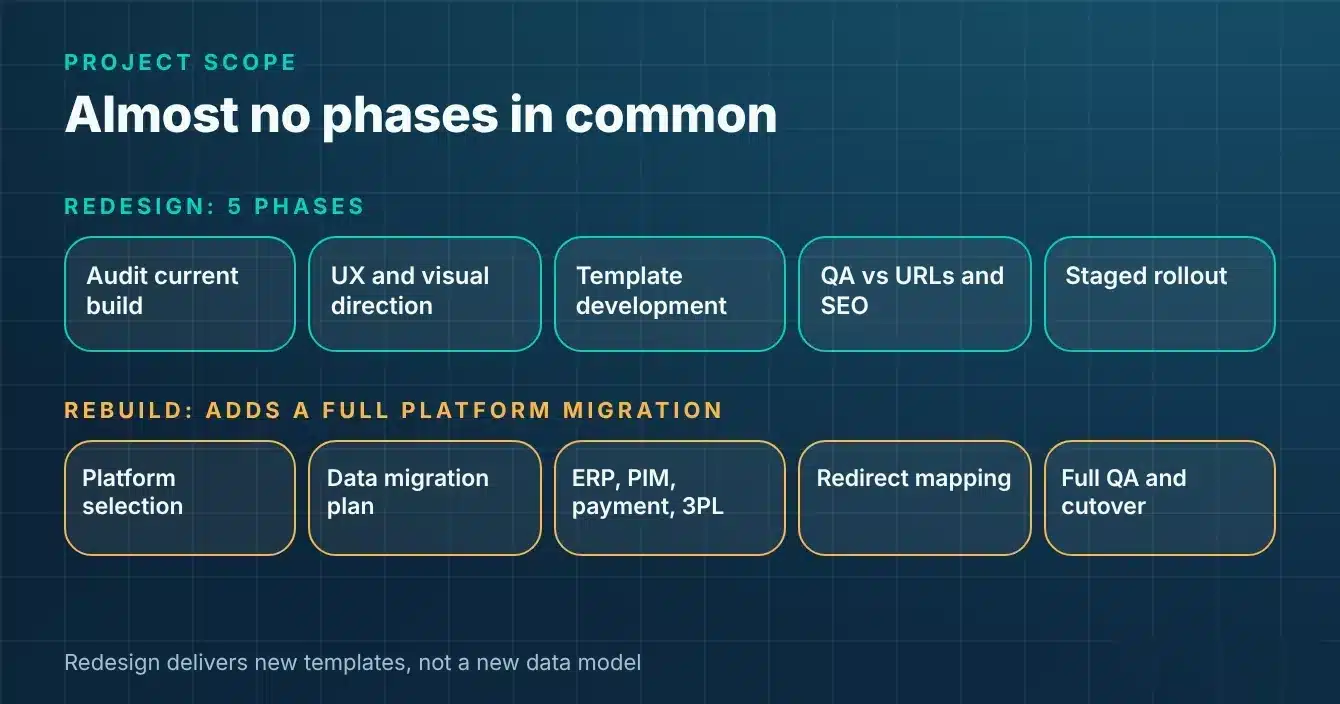
A redesign moves through design and template phases, while a rebuild adds a full platform migration on top. The two projects share a goal, a better-performing store, but almost no phases in common. A full rebuild sometimes also means moving toward headless commerce, which is a bigger architecture change than either path alone.
Inside a redesign project
A redesign starts with an audit of the current build, then moves into UX and visual direction. Template-level development follows, then QA against your existing URLs and SEO equity, then a staged rollout. The deliverable is new templates, not a new data model.
A typical team is a designer, a front-end developer, and QA, with no data migration specialist required. One factual note worth planting here: an ecommerce website redesign project is exactly this scope, not a platform swap.
Inside a rebuild or replatform project
A rebuild starts with platform selection, then a full data migration plan. Integration rebuilds for ERP, PIM, payment, and 3PL systems follow, alongside redirect mapping for SEO. Parallel QA on the new platform and a defined cutover window close out the project.
The deliverable is a new platform instance, not just new templates. A typical team adds a migration and integration specialist, plus a longer QA and staging cycle. A documented WooCommerce migration guide is a useful reference for what that staging cycle actually involves.
Whichever path fits, the team executing it matters as much as the decision itself. Teams offering WooCommerce development services with both template and migration specialists can run either project well.
People also ask
Is replatforming the same thing as a rebuild?
Not exactly, though the terms are often used interchangeably. Replatforming usually means moving to a new platform while keeping most business logic intact. In practice, the two terms blur together once a project actually starts.
How do I know if my ecommerce site needs a redesign or a rebuild?
Run the six factors above against your own store: scope, platform constraints, technical debt, budget, timeline, and risk tolerance. If most point toward redesign, trust that result instead of defaulting to the bigger project. A rebuild is the exception, not the default.
Can I redesign my site without losing SEO rankings?
Yes, if the redesign is scoped around preserving URLs, redirects, and existing content, not just the visual layer. SEO risk comes from sloppy migration work, not from the act of redesigning itself. Treat redirect mapping and QA as mandatory steps, not optional ones.
What’s the difference between a website refresh and a full redesign?
A refresh changes colors, fonts, and imagery without touching how the store functions. A full redesign changes layout, navigation, and checkout flow to fix how shoppers actually move through the store. Scope of change separates the two, not how different the final result looks.
Conclusion
Six factors decide this question far better than a feeling about how old the site looks. Scope, platform limits, technical debt, budget, timeline, and risk tolerance each point in one direction.
Most stores land on redesign once they run through all six honestly. Save the rebuild for the rare case where the platform itself is the real blocker.
Frequently Asked Questions
What’s the difference between redesign and replatform?
A redesign changes the templates and experience on your current platform. A replatform moves the store to a new platform entirely, including its data model and integrations. The two terms are often used loosely, but that distinction is the one that actually matters for scoping a project.
How long does an ecommerce rebuild take?
A rebuild typically runs four to eight months or more, depending on catalog size and integration count. A redesign usually fits inside a quarter by comparison. Treat both as directional ranges, not fixed quotes, since every store’s scope differs.
Is a rebuild worth it for a smaller store?
Store size matters less than whether the platform is actually blocking you. A small store hitting a genuine platform ceiling still needs a rebuild. A larger store with only template-level problems still only needs a redesign.
Do I lose my SEO rankings in a rebuild?
You risk losing rankings if redirects, URL structure, and content aren’t carried over deliberately. A rebuild does not have to cost rankings if migration QA treats SEO as a first-class requirement. Most ranking losses trace back to skipped redirect mapping, not the platform change itself.
What does technical debt actually look like day to day?
It looks like every small change needing a developer because the last five patches made the build fragile. It shows up as plugins nobody remembers installing and integrations held together with undocumented custom code. The warning sign is the pattern, not any single incident.
Should I redesign before or after fixing a slow site?
Fix the slow site first if speed is a local, fixable problem on the current platform. Fold speed work into the redesign itself if slow pages are one symptom among several. Either way, do not approve a new design without a measurable speed target attached.
What’s the biggest mistake businesses make in this decision?
The biggest mistake is skipping straight to a rebuild because the site feels old. Nobody checks first whether the problem is actually structural. The second most common mistake is choosing a platform based on a vendor’s preference instead of your own constraints.
How do I estimate rebuild cost before getting a quote?
Start with the comparison table above and treat the multiples as a baseline, not a final number. Multiply your last redesign cost, or a reasonable market estimate for one, by three to five. Use that range to sanity-check any vendor quote you receive.