Summary
WooCommerce’s default checkout is built for buyers who pay now. Your B2B buyers don’t work that way. They operate on 30-to-60-day payment cycles, require a PO number field, and need an invoice they can route through their AP process.
Research shows 67% of B2B buyers abandon when no payment terms are available at checkout. Separately, 78% call payment terms an essential factor when choosing a supplier.
This guide covers the three models for adding net terms to WooCommerce: plugin-based manual credit, financed net terms, and a PO gateway with ERP integration. For each model, you’ll find the trade-offs on cost, credit risk, and ERP requirements, plus a direct recommendation based on your operation type.
Introduction
WooCommerce expects payment at the moment of checkout. Stripe processes a card, PayPal collects funds, and the order completes. That workflow is fine for a consumer buying a pair of shoes.
It breaks the moment a procurement manager needs a $25,000 order approved through AP before any payment moves. They look for a Net 30 option. There isn’t one.
They leave, and your store doesn’t record an abandonment. It records nothing.
This guide is for WooCommerce store operators at B2B manufacturers, distributors, and wholesalers who know the problem exists and want a clear path forward. You’ll get a plain explanation of how net terms work and which of the three models fits your operation. You’ll also see what to have in place before the first net terms order lands.
No vendor pitches. No plugin tutorials. Just the framework you need to make the right call.
Table of Contents
- Why does WooCommerce’s default checkout lose B2B orders?
- What are net payment terms and which B2B buyers use them?
- How much revenue are you losing by not offering net terms?
- What are the three ways to add net terms to WooCommerce?
- Which net terms model fits a manufacturer or distributor?
- Real-world scenarios: which model fits?
- How do you restrict net terms to approved accounts only?
- How do net terms connect to your ERP and invoicing workflow?
- What happens when a buyer pays late?
- What should you have before going live with net terms?
- Key takeaways
- Common mistakes when setting up net terms
- People also ask
- Frequently asked questions
- Conclusion
Why does WooCommerce’s default checkout lose B2B orders?
WooCommerce loses B2B orders because its default gateways only support immediate payment. Stripe, PayPal, and every bundled option require card details at checkout. A procurement manager with a $25,000 purchase order and a 30-day payment cycle cannot use that workflow.
B2B buyers at manufacturers, distributors, and government agencies work on formal purchase order cycles. Their AP departments require an invoice in a specific format, routed for approval, with a defined payment window. When your checkout offers only card payment, you’re presenting a dead end.
The data confirms the scale. According to the 2025 B2B Commerce Buyer Expectations Report, 67% of B2B buyers abandon a purchase when no payment terms are available at checkout. Separately, 78% call payment terms an essential factor when selecting a new supplier.
This is not a buyer preference gap. It is a structural incompatibility between how WooCommerce collects payment and how B2B buyers are required by their own finance teams to operate. Understanding the B2B customer portal features that sit alongside net terms is a helpful starting point for seeing the full picture.

What are net payment terms and which B2B buyers use them?
Net payment terms give a buyer a defined window to pay an invoice after the order ships or is invoiced. Net 30 means the full invoice amount is due within 30 days of the invoice date. Net 60 and Net 90 extend that window to 60 and 90 days respectively.
According to Clearly Payments 2026 B2B payment statistics, Net 30 appears on approximately 55-65% of B2B invoices in North America. Net 60 accounts for roughly 15-25%, mostly at enterprise buyers with longer AP cycles. Net 90 is uncommon outside government contracts, large construction projects, and some manufacturing agreements.
Who uses net terms at checkout? Procurement teams at mid-to-large manufacturers, wholesale distributors restocking inventory, government and municipal buyers, and healthcare or education organizations. For most of them, net terms are a procurement requirement, not a preference.
Average days sales outstanding (DSO) runs 45-60 days in manufacturing and 30-50 days in wholesale distribution. These buyers are not asking for flexibility. They are operating within the payment infrastructure their finance teams built.
How much revenue are you losing by not offering net terms?
The calculation is straightforward: multiply your monthly B2B checkout attempts by 67%, then by your average order value. That number estimates your monthly revenue leak from buyers who leave because no net terms exist. For a store with 100 B2B checkout attempts and a $5,000 average order value, that is a potential $335,000 per month walking out the door.
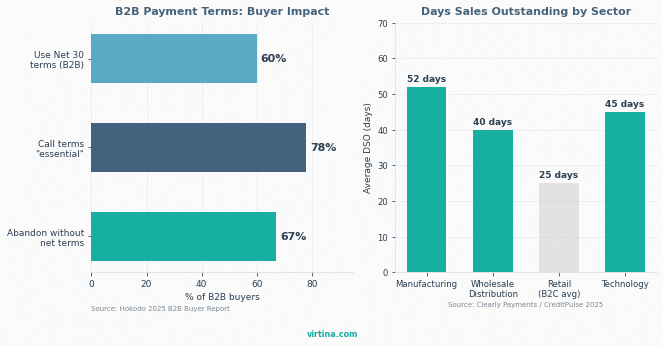
B2B buy-now-pay-later transactions are approaching $500 billion globally by 2026 per IDC projections. Embedded credit at checkout is no longer a differentiator. It is baseline expectation for sophisticated B2B buyers.
Approximately 41% of B2B WooCommerce merchants already offer customer-specific payment terms. That leaves 59% of the market without this capability. The gap is closing as buyers shift spend to suppliers who make the transaction easy.
Over 70% of B2B buyers today are Millennials or Gen Z, per Forrester research. They evaluate suppliers online independently before any sales call happens. They compare checkout capabilities the same way they compare product specs.
A checkout that forces a card on a procurement professional signals that the store was not built for B2B. Following B2B checkout best practices matters more than most WooCommerce operators realize until a large account quietly moves to a competitor.
What are the three ways to add net terms to WooCommerce?
Three distinct implementation models exist for adding net terms to a WooCommerce store. Each model solves the same checkout problem with different trade-offs on cost, cash flow, and ERP requirements. The model you choose should follow from your operation type, not from whichever plugin appears first in a search result.
Model A: Plugin-based manual credit
A plugin creates an invoice payment method at checkout. The buyer selects it, the order is placed, and WooCommerce holds it in a pending payment status. The store operator manually approves accounts, sets per-customer credit limits, and tracks payment outside WooCommerce, typically in a spreadsheet or accounting tool.
Plugins like Wholesale Suite Payments and B2BKing’s invoice gateway handle this model. Cost runs $99-$300 per year. There is no automated credit underwriting, and the seller carries all credit risk.
Best for:
- Small wholesalers with a known, repeat buyer base
- Stores under 50 net terms orders per month
- Operations with no ERP that want a fast, low-cost start
Trade-offs:
- Seller carries all credit risk
- No automated credit underwriting
- Manual AR tracking breaks down above 50 orders per month
Model B: Financed net terms
A third-party platform integrates directly into your WooCommerce checkout and underwrites the buyer’s credit in real time. The buyer selects net terms, and the platform approves or declines them instantly. If approved, the platform pays your store upfront, typically within 1-2 business days.
The buyer then pays the platform on Net 30 or 60 terms. You receive full payment immediately and carry zero credit risk. The cost is 1-3% per transaction, and platforms like Resolve Pay and Balance offer WooCommerce integrations for this model.
Best for:
- High-volume distributors where cash flow is a constraint
- Stores acquiring new buyers with no payment history
- Operations that want zero credit risk and same-day payment
Trade-offs:
- 1-3% transaction fee on every net terms order
- Platform handles the buyer relationship on the payment side
- Reconciliation step required on the platform side
Model C: PO gateway plus ERP integration
A custom or semi-custom payment gateway captures the buyer’s PO number at checkout and holds the order in a pending status. No money moves at checkout. Your ERP then receives the order, generates the invoice, and handles aging and collections through your existing AR workflow.
This model requires an ERP connection and involves the longest DSO of the three. It is the best match for manufacturers and distributors whose enterprise buyers are on formal PO cycles. If you’re running Model C, your net terms setup is only as good as your WooCommerce ERP integration. If you’re still on Volusion, read our Volusion to WooCommerce migration guide before planning net terms.
Best for:
- Manufacturers with an existing ERP (SAP, NetSuite, Acumatica)
- Enterprise buyers who require a PO number field at checkout
- Operations that need WooCommerce orders to enter their AR workflow automatically
Trade-offs:
- Highest setup complexity and longest time to deploy (4-12 weeks)
- ERP connector development required
- Seller still carries credit risk
The table below compares all three models across the factors that matter most to operators.
Factor | Model A: Plugin-based | Model B: Financed net terms | Model C: PO gateway plus ERP |
|---|---|---|---|
Setup complexity | Low. Plugin install and configuration | Medium. Third-party account setup and checkout integration | High. Custom gateway plus ERP connector development |
Cost | $99-$300/year | 1-3% per transaction | $300-$500/year plus dev time for ERP connector |
Credit risk | Seller bears it | Third party bears it | Seller bears it |
Best for | Small wholesalers, known buyer base, low volume | High-volume stores, cash-flow priority, new buyer acquisition | Manufacturers with existing ERP and enterprise buyers on formal PO cycles |
ERP sync | Not required | Not required (simplifies AR) | Required. Order must trigger AR entry in ERP |
Speed to deploy | Days | 1-2 weeks | 4-12 weeks depending on ERP complexity |
Costs and tools cited are representative 2026 figures. Verify current pricing before purchasing.
Which net terms model fits a manufacturer or distributor?
Model fit comes down to three variables: monthly order volume, whether you run an ERP, and how much credit risk your cash flow can absorb. Here is the direct recommendation for each operation type.
Small-to-mid wholesalers with a known, repeat buyer base and no ERP: Model A is the right starting point. The cost is low, configuration is manageable, and with an established buyer base, credit risk is predictable. A manual credit approval process is workable at under 50 net terms orders per month.
High-volume distributors or stores where cash flow is a constraint: Model B eliminates credit risk entirely. The 1-3% transaction fee is the cost of moving that risk to a third party, and you get paid on day one. This model also works well when adding net terms for new buyers who have no payment history with you.
Manufacturers with an existing ERP (SAP, NetSuite, Acumatica, or similar) and enterprise buyers on formal PO cycles: Model C is the correct choice. Your buyers expect a PO number field at checkout and an invoice in the format their AP department requires.
When you set up B2B ecommerce for manufacturers correctly, the payment model matches the buyer workflow. The WooCommerce order enters your existing AR infrastructure automatically.
One important nuance: these models are not mutually exclusive. A common approach is to run Model A for known, credit-approved accounts and Model B for new buyers without a payment history. Your WooCommerce B2B pricing and account management setup should make it straightforward to assign different payment options to different account tiers.
Real-world scenarios: which model fits?
Three operation types, three clear answers. Match your situation to the scenario below.
Scenario 1: Small wholesale distributor, 20-40 B2B orders per month
Recommended model: Model A (plugin-based).
- Order volume is low enough for manual credit approval
- Buyer base is known, so credit risk is predictable
- No ERP in place, so a plugin is the fastest and lowest-cost path
- Setup takes days, not weeks
Scenario 2: High-volume distributor, 100+ net terms orders per month
Recommended model: Model B (financed net terms).
- Manual credit tracking breaks down at this volume
- Cash flow cannot absorb risk across 100+ open invoices
- New buyer acquisition means approving accounts without payment history
- Platform pays you upfront, eliminating credit risk entirely
Scenario 3: Manufacturer with SAP or NetSuite, enterprise buyers on formal PO cycles
Recommended model: Model C (PO gateway plus ERP integration).
- Enterprise buyers require a PO number field at checkout
- AP departments need an invoice in a specific format
- WooCommerce orders must enter the ERP AR workflow automatically
- ERP already holds the customer credit record
How do you restrict net terms to approved accounts only?
Restrict net terms by tying the payment method to a WooCommerce user role. Only buyers who have been approved and assigned the correct role see the net terms option at checkout. Everyone else, including retail buyers and guest checkouts, sees only card payment options.
You create a custom user role, such as “Approved Wholesale Account.” The net terms payment gateway is configured to display only for accounts in that role. Retail buyers and guest checkouts never see it.
When a new B2B buyer wants net terms access, they apply through your account portal or a request form. Your team reviews the request, approves the account, assigns the role, and sets a credit limit. From that point, the buyer sees the net terms option at checkout.
For Model A, credit limits are set manually per account, and most B2B plugins support this natively. For Model B, the financed platform handles underwriting automatically at checkout. For Model C, the ERP customer record determines eligibility and WooCommerce reads account status through the integration.
The principle is the same across all three: net terms is a gated feature for verified buyers, not an open option. Getting your B2B store’s fundamentals right includes this kind of role-based access architecture from the start.
How do net terms connect to your ERP and invoicing workflow?
Net terms connect to your ERP by routing each WooCommerce order into your accounts receivable workflow as an AR entry. Without that connection, WooCommerce holds the order while the ERP knows nothing about it. That split is manageable at five net terms orders a month and breaks at fifty.
With Model C, the WooCommerce order triggers an AR entry automatically. Your ERP generates the invoice, delivers it to the buyer’s AP department, and handles aging and collections through your existing process. There is only one system of record for the receivable.
Connecting WooCommerce to your ERP at this level involves connector options, real-time sync requirements, and pitfalls that trip up most first implementations. The WooCommerce ERP integration guide linked in Model C above covers all of this in detail.
Managing AR across all three models
For Model A without an ERP, most stores manage AR via the plugin’s tools or a spreadsheet. That is acceptable at low volume. Past 50-100 net terms orders per month, manual tracking creates late-payment blind spots that cost real money.
For Model B, the financed platform collects from the buyer directly, so your ERP sees only a single incoming payment per period. That simplifies AR but requires a reconciliation step. Review the platform’s reconciliation reports monthly to keep your AR records current.
A pattern common in distributor implementations: a wholesale operator starts Model A with 20 net terms accounts and a spreadsheet. By month six, volume reaches 80 orders and several accounts are overdue with no automated reminder in place. The corrective steps are always the same: establish the dunning sequence and integrate AR tracking before extending credit to new accounts.
What happens when a buyer pays late?
When a buyer pays late, your dunning sequence activates automatically. Configure this sequence before your first net terms order ships.
- Day 30: Payment reminder sent to the buyer
- Day 45: Formal overdue notice issued
- Day 60: New orders placed on hold
- Day 90: Account referred to collections
Stores that skip this setup discover the problem 90 days later with balances they cannot collect.
Most WooCommerce B2B plugins support order holds and account suspension natively. Configure those triggers before the first net terms order ships, not after the first invoice goes overdue. Agree on the sequence internally so the response is automatic, not ad hoc.
Set a credit limit per account that your cash flow can absorb if the buyer doesn’t pay. Never extend net terms on an order that exceeds the approved limit without a separate authorization. That one rule prevents the largest unpaid balances.
Also give buyers a way to pay early online. Businesses that offer a digital payment path alongside net terms report DSOs 12-18 days lower than invoice-only peers, per Clearly Payments 2026 data. A “pay your invoice now” link in the invoice email is a small addition that meaningfully shortens the cash cycle.
Tools that help B2B stores reduce buyer support load can also handle routine payment questions so your team isn’t manually chasing every overdue account.
What should you have before going live with net terms?
Before going live with net terms, you need seven things in place. Getting even one wrong means discovering the gap when the first order goes sideways. The checklist below covers each one.
- Credit policy. Define which customers qualify, what credit limits apply per account tier, and who inside your organization approves exceptions above a threshold.
- Approval workflow. How does a new B2B buyer request net terms access? Who reviews it, and what is the turnaround time? This should be a defined process, not ad hoc decisions in someone’s inbox.
- Payment method visibility. Confirm which WooCommerce user roles see the net terms option at checkout and which do not. Test this with a buyer-role test account before going live.
- Invoice delivery. How does the buyer receive the invoice? WooCommerce email, ERP-generated PDF, or through a third-party platform? The buyer’s AP department needs it in a format they can process.
- Dunning policy. Write down your escalation sequence before launch. Friendly reminder, formal notice, order hold, collections referral. Agree on the timeline internally.
- ERP readiness. If you’re running Model C, the ERP connector must be tested and AR sync confirmed before going live. A failed sync on the first net terms order is the kind of problem that creates manual cleanup for weeks.
- End-to-end test. Complete a full test order as an approved buyer-role account. Confirm the net terms option appears, the PO field captures correctly, the invoice sends, and the ERP receives the AR entry if applicable.
Where net terms fits within your broader B2B ecommerce feature build is worth thinking through before you deploy. Payment terms, pricing tiers, quote workflows, and ERP integration all relate to each other. When you’re ready to plan the full build, that context matters.
Also consider the broader payment options for B2B stores your buyers may expect alongside net terms, including card payment fallback, ACH, and early payment discounts.
Key takeaways
Your situation | Monthly volume | Recommended model |
|---|---|---|
Small wholesaler, known buyer base, no ERP | Under 50 orders | Model A: Plugin-based |
High-volume store, cash flow priority | 100+ orders | Model B: Financed net terms |
Manufacturer with ERP, enterprise PO buyers | Any | Model C: PO gateway plus ERP |
New B2B buyers, no payment history | Any | Model B (new buyers) + Model A (returning accounts) |
Store growing from 50 to 100+ orders | 50-100 orders | Migrate from Model A to Model B |
Common mistakes when setting up net terms
Most implementation problems are predictable. These four mistakes appear in almost every first deployment.
1. Opening net terms to all buyers without approval
Net terms must be gated to approved accounts. Unrestricted access exposes you to credit risk from buyers with no payment history.
2. Setting no per-account credit limits
Without a credit limit per account, a single buyer can accumulate more open balance than your cash flow can absorb. Set conservative limits before the first order, not after the first overdue invoice.
3. Skipping dunning sequence configuration
Most stores go live with net terms and skip dunning setup. The first overdue invoice reveals the gap, usually 45 days after it was preventable. Configure your escalation sequence before the first order ships.
4. Going live before completing an end-to-end test
Complete one full test order as an approved buyer-role account before launch. Confirm the net terms option appears, the PO field works, the invoice sends, and the ERP syncs if applicable.
People also ask
Can WooCommerce handle net 30 payment terms natively?
No. WooCommerce does not include net terms natively. Its default gateways are built for immediate payment collection.
To add Net 30 or Net 60, you have three options:
- A plugin-based invoice gateway (Model A)
- A financed net terms platform with a WooCommerce integration (Model B)
- A custom PO gateway connected to your ERP (Model C)
The right choice depends on your order volume, your buyer mix, and whether you already run an ERP system.
What is the difference between net 30 and a trade credit account?
They refer to the same concept. Trade credit is the general term for selling on deferred payment terms. Net 30, Net 60, and Net 90 specify the number of days the buyer has to pay the invoice.
Net 30 is the most common in North American B2B commerce, appearing on approximately 55-65% of B2B invoices in manufacturing and wholesale. When a buyer says they need to pay “on terms,” they mean trade credit with a defined net period.
Do I need an ERP to offer net terms in WooCommerce?
No, not for Models A or B. Plugin-based and financed net terms both work without an ERP.
However, if you’re managing more than 50-100 net terms orders per month, manual AR tracking becomes a real problem. At that volume, ERP integration stops being optional. If you already run an ERP, Model C gives you the cleanest workflow.
What plugin is best for WooCommerce B2B net payment terms?
The answer depends on which model you’re implementing.
- Model A (plugin-based): Wholesale Suite Payments and B2BKing’s invoice gateway are the main options
- Model B (financed): Resolve Pay and Balance both offer WooCommerce integrations
- Model C (PO gateway plus ERP): Custom development or a semi-custom gateway
Choose the model first, then evaluate the tools that serve it.
Frequently asked questions
How do I set credit limits per customer in WooCommerce?
WooCommerce does not support per-customer credit limits natively. You need a B2B plugin that adds this capability. Wholesale Suite and B2BKing both allow store admins to set a credit limit per customer account.
When a buyer’s outstanding balance reaches their credit limit, new orders are blocked until existing invoices are paid. Set these limits conservatively for new accounts and review them after 2-3 payment cycles.
Can I offer different net terms to different customer groups?
Yes, and this is the recommended approach. Use WooCommerce user roles to segment your buyer accounts. A “Preferred Distributor” role might have access to Net 60 terms and a $50,000 credit limit.
A “Standard Wholesale” role gets Net 30 and a $10,000 limit. Retail buyers see no net terms at all. The payment gateway restriction is tied to the role, so each account type sees only the options you’ve configured for their tier.
What happens if a B2B buyer exceeds their credit limit?
The net terms payment method should be blocked at checkout when a buyer’s outstanding balance reaches their credit limit. The buyer would need to either pay down existing invoices or request a temporary limit increase from your team.
Most B2B plugins support this blocking behavior natively. Configure it before you go live so you’re not manually reviewing every order against an external spreadsheet.
How do I handle partial payments on a net terms order?
WooCommerce does not handle partial payment natively. For plugin-based net terms (Model A), partial payments are typically recorded manually and tracked outside WooCommerce.
If you need partial payment support in the store’s order workflow, that requires custom development or an ERP integration. For financed net terms (Model B), the platform handles the payment relationship entirely. Partial payment from the buyer becomes the platform’s concern, not yours.
Is Resolve Pay the same as adding a WooCommerce pay-later plugin?
Not exactly. Resolve Pay is a financed net terms platform (Model B), not a pay-later plugin. The distinction matters.
A pay-later plugin creates a deferred payment method that the seller manages and carries credit risk on. Resolve Pay underwrites the buyer at checkout, pays the seller upfront, and handles collections independently. The cost is a transaction fee, not a plugin subscription.
Should net terms apply to guest checkout or only logged-in accounts?
Only logged-in accounts with the correct user role. Guest checkout cannot be approved for net terms because there is no account to assign a credit limit or role to. This is why most B2B stores disable guest checkout entirely.
Require account registration, approve accounts through your defined workflow, and restrict net terms to approved logged-in buyers. Guest checkout and net terms are a credit risk combination you want to avoid.
How do I run a credit check before approving a buyer for net terms?
The process varies by model:
- Model A: Manual. Your team reviews business details and credit bureau data, then assigns the approved role and credit limit.
- Model B: Automated. The platform runs a real-time credit check at checkout. No manual review needed on your side.
- Model C: Existing ERP customers may already have credit data. New accounts require manual review before being added to the ERP and synced to WooCommerce.
Conclusion
Pick the model that fits your operation. Build the credit policy, approval workflow, and dunning sequence before the first net terms order lands. The implementation determines whether net terms drives revenue or creates credit risk.
Virtina implements net payment terms for B2B manufacturers and distributors on WooCommerce, from plugin setup through full ERP integration. Talk to our WooCommerce team about your setup.