Summary
Most high risk store owners can get a WooCommerce plugin for Authorize.Net, NMI, USAePay or CCBill, but the plugin is only half the job. This guide shows which gateways have a plugin in October 2026, what each listing says about block checkout, HPOS and subscriptions, and how to check a plugin before you install it. Fees and reserves are covered in our high-risk processing guide.
Introduction
Search for a high risk payment gateway for WooCommerce and most results are lists of processors. Few tell you whether a working plugin exists, or whether it breaks on the new checkout. That gap is where stores lose launch weeks.
We kept this page to the WooCommerce side of the decision. Business terms live in our high-risk payment processing guide; this page tells you which gateways connect, and how to verify them.
Table of Contents
- Summary
- Introduction
- Why does a high risk WooCommerce store need a different payment setup?
- Is a high risk gateway the same thing as a high risk merchant account?
- Which high risk payment gateways have a WooCommerce plugin in 2026?
- How does each option connect to your checkout?
- Which merchant account providers pair with these gateways?
- What should you check on a gateway plugin before installing it?
- Can you trust the high risk gateway plugins on WordPress.org?
- Which setup fits which kind of store?
- What does it take to connect a high risk gateway to WooCommerce?
- How should you pick in the next week?
- Frequently Asked Questions
Why does a high risk WooCommerce store need a different payment setup?
Standard payment tools are built for low-risk catalogs. WooPayments lists tobacco and vapes, firearms and ammunition, adult content and supplements backed by unsubstantiated claims as prohibited, and tells CBD sellers to use Square or Viva Wallet instead. Stripe publishes a restricted-business list that covers similar ground, including negative option marketing and unclear free-trial pricing.
That is why high risk stores end up with a separate gateway and merchant account. The business side of that choice (fees, reserves, volume caps and the 8-step approval process) is already covered in our high-risk payment processing guide and in what underwriters check. This guide does not repeat it. It answers the WooCommerce question that comes next: once a processor says yes, which gateway can your store actually plug into?
Is a high risk gateway the same thing as a high risk merchant account?
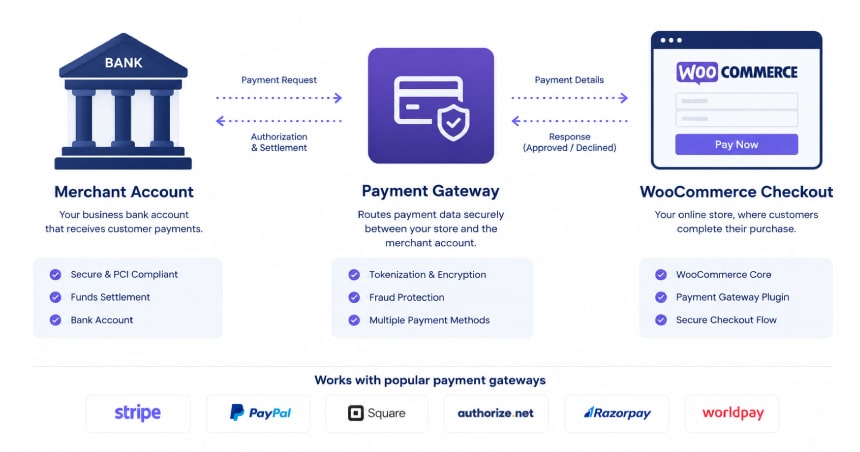
No, and mixing them up is the most common planning mistake. The merchant account is the bank-side approval. The gateway is the software layer that moves card data from your checkout to that account. A WooCommerce plugin only connects to the gateway.
Payment Nerds makes the same point in its 2026 WooCommerce guide: a gateway being compatible with WooCommerce does not mean the acquirer will approve your business, because gateway approval and merchant account approval are separate. In practice you pick the gateway your acquirer supports, then check that a maintained plugin exists for it.
Which high risk payment gateways have a WooCommerce plugin in 2026?
The table below covers gateways that high-risk guides and merchant account providers commonly pair with WooCommerce, and what each plugin listing says today. We checked the WooCommerce.com and WordPress.org listings on October 9, 2026. Prices shown are for the plugin only. Processing rates and reserves come from your processor.
| Gateway | Plugin and cost | Block checkout | HPOS | Recurring billing |
|---|---|---|---|---|
| Authorize.Net | Official WooCommerce extension, $79 for a 1-year plan | Listed as compatible | Listed as compatible | Full support, including eCheck sign-up |
| NMI (via Gain Commerce plugin) | Free plugin, paid Premium Add-on | Built for Checkout Blocks | Fully compatible | Premium Add-on plus WooCommerce Subscriptions |
| NMI (via AGMS Pay) | Free plugin, standard AGMS processing rates | Works with Block Checkout | Compatible | Not yet available (on the roadmap) |
| USAePay (independent plugin) | Free, paid Advanced version | One payment method block | Compatible since version 4.1.0 | Paid Advanced version only |
| CCBill | Free plugin from CCBill | Supports blocks checkout | Not stated on the listing | Yes, with WooCommerce Subscriptions |
An unstated cell does not mean a feature is missing. It means the listing does not say, so ask the publisher or test on staging before you commit.
How does each option connect to your checkout?
Authorize.Net. This is the best documented option. The official extension supports Accept.js, which keeps card entry off your server, and saved cards through Authorize.Net CIM. It works with merchant accounts in the United States, Canada, Australia and New Zealand. The listing makes no high-risk claims, so approval still depends on the acquirer behind your account. Soar Payments and Payment Nerds both describe Authorize.Net as a gateway used through a high-risk acquirer.
NMI. NMI is a gateway layer that many high-risk acquirers resell. The WooCommerce plugins we found are published by third parties, not by NMI itself. The Gain Commerce plugin tokenizes cards in the browser with NMI Collect.js, supports Apple Pay and Google Pay, and adds bot protection with reCAPTCHA v3 or Cloudflare Turnstile. AGMS Pay also uses Collect.js and adds 3D Secure, but its listing says subscriptions are not available yet.
USAePay. The plugin on WordPress.org is published by an independent developer, not by USAePay, and takes payments without redirecting the customer. The free version covers refunds from the dashboard and authorize-only transactions. Subscriptions, pre-orders, ACH and saved cards need the paid Advanced version.
CCBill. CCBill publishes its own plugin and handles payment entry on its side, so no card data is stored on your WooCommerce site. It offers two integration methods, Advanced Integration and FlexForms. CCBill lists industries such as adult, dating and CBD on its own site, so it is worth a look if mainstream gateways have refused you.
Which merchant account providers pair with these gateways?
Providers such as PaymentCloud, Soar Payments and Bankful appear most often in 2026 high-risk WooCommerce guides. They are merchant account providers, not WooCommerce plugins. Soar Payments says it supports Authorize.Net, NMI and USAePay, and states that many applications are approved within 48 to 72 hours. That is a vendor claim, not a guarantee, and approval depends on your documents and chargeback history.
For the full list of 15 processors with fees, reserve types and chargeback costs, use our high-risk payment processing guide. We keep that comparison in one place on purpose, so this page does not compete with it.
What should you check on a gateway plugin before installing it?
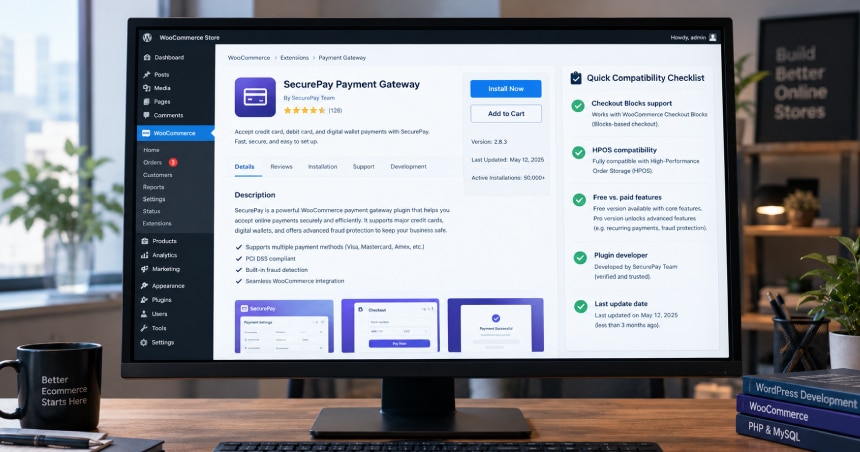
A gateway can be approved by your processor and still fail at checkout if the plugin is out of date. Our WooCommerce payment gateway integration team sees this often in 2026, mostly with older plugins. Check these five things on the listing before you install:
- Block checkout support. Newer WooCommerce stores use the block-based checkout, and a plugin that does not register for it can leave the payment method missing.
- HPOS compatibility. A plugin that reads the old posts table can lose orders. See our guide to migrating to HPOS.
- Free versus paid features. Subscriptions are paid-only on the USAePay and Gain Commerce plugins.
- Who publishes it. Official plugin or independent developer? Independent plugins can still be good, but you own the support risk.
- Recent updates. Look at the last update date and the WordPress and WooCommerce versions it was tested with.
Can you trust the high risk gateway plugins on WordPress.org?
Treat them with caution. The WordPress.org tag for high-risk payment gateways lists only three plugins today. Their active installs are 40+, 10+ and fewer than 10, and two of them accept crypto. Some advertise instant approval. Small install counts are not proof of a problem, but they mean few stores have tested the plugin under real chargeback and refund pressure.
Before using any of them, confirm who the real payment processor is, whether card data is tokenized before it reaches your server, and what happens to your funds if the provider closes your account.
Which setup fits which kind of store?
Match the plugin features to the way you actually sell, then confirm the processor accepts your category.
| Store type | What to look for |
|---|---|
| Subscription or membership store | A plugin with recurring billing support. Authorize.Net, CCBill, and the paid add-ons for NMI and USAePay list it. Avoid unclear free-trial pricing, which Stripe lists as prohibited. |
| CBD or hemp | WooPayments sends CBD to Square or Viva Wallet, but see our Square account closure guide before relying on that route. |
| Vape and tobacco | Prohibited on WooPayments. Plan around a high-risk merchant account first, then choose the gateway it supports. |
| Adult or dating | Look at specialists such as CCBill, which lists these industries and publishes its own WooCommerce plugin. |
| Supplements | WooPayments bars products with unsubstantiated claims. Keep your product claims clean and your chargeback ratio low before you apply. |
What does it take to connect a high risk gateway to WooCommerce?
Once the merchant account is approved, the technical work is smaller than the approval, but it is where launches slip. The usual path is: review the gateway, build in a sandbox, add the checkout, set risk controls such as 3D Secure, test the order flow, then go live. We run eight transaction states on staging before launch, including declines, refunds and partial captures.
If you want a second pair of eyes before you commit to a plugin, our team can review your gateway choice for block checkout and HPOS fit. Start with our WooCommerce payment gateway integration page.
How should you pick in the next week?
Start with your category and ask two or three acquirers which gateway they support. Then check the plugin table above for that gateway. Install it on staging, run test orders including a refund and a declined card, and only then request the live keys. If a plugin fails any of the five checks, change the plugin before you change the processor.
People also ask
Is there one best high risk payment gateway for WooCommerce? No. The best choice is the gateway your approved acquirer supports, with a maintained plugin that passes block checkout and HPOS tests.
Conclusion
A high risk WooCommerce store needs two yeses: one from a merchant account provider, and one from your own checkout. Pick the gateway your acquirer supports, then verify the plugin for block checkout, HPOS and recurring billing on staging.
Need a hand? Our team can review your gateway choice and connect it to your store. See our WooCommerce payment gateway integration page to get started.
Frequently Asked Questions
Do high risk payment gateways work with WooCommerce?
Yes, if the gateway has a maintained plugin or an API a developer can integrate. Authorize.Net, NMI, USAePay and CCBill all have WooCommerce plugins. Approval of your business is a separate step with the merchant account provider.
Which gateway has an official WooCommerce extension?
Authorize.Net is sold on WooCommerce.com at $79 for a 1-year plan. CCBill publishes its own plugin on WordPress.org. The NMI and USAePay plugins we found are by independent developers.
Can I use WooPayments or Stripe for a high risk store?
Not for many categories. WooPayments lists tobacco and vapes, firearms and ammunition and adult content as prohibited, and Stripe restricts or prohibits several high-risk categories. Check each policy for your exact product.
Do these plugins support block checkout and HPOS?
Most current listings say yes. Authorize.Net, Gain Commerce NMI, AGMS Pay and the USAePay plugin list HPOS support, and CCBill lists block checkout support. Always test on staging.
Where can I see fees and reserve rules for high risk processors?
In our high-risk payment processing guide, which compares 15 processors and explains rolling, capped and upfront reserves.
Can Virtina connect a high risk gateway to my store?
Yes. See our WooCommerce payment gateway integration page for how we review, build and test the checkout.